This document is both a report on the current work and a summary of some lessons learned.
It may help later students get up to speed on court judgment data cleaning more quickly.
I hope future students will value optimizing engineering techniques, summarizing them, and sharing documentation.
Think about how to optimize the engineering, optimize team collaboration, and turn accumulation and output into a capability.
The world needs not only input but also output; the sharing and transmission of knowledge is the bond that keeps human civilization advancing.
Foreword
Which AI to choose
On AI tool recommendations: if you can use GPT or Claude, go with those top-tier ones.
But just as vibe coding has delivered its shock to the world — vibe slop. When we use AI for programming, we need to care even more about the verifiability, reusability, safety, compatibility, and readability of the code.
Code style
There is a tradeoff between reusability and readability. For example, I personally don’t love the top-journal style that frantically uses program, global, and capture. Statistical code is not product code; in research, unless we’re doing heavy numerical computation, we generally don’t need to bother with complex macros to optimize runtime. Most of the time we only care about how data cleaning reduces memory usage and improves reusability. All things considered, I think the readability of statistical code matters more in teamwork.
In the AI era, rather than code runtime efficiency, what we need to strengthen more is code review.
Writing more comments is also very important.
I personally prefer to use local to implement code functionality, so I often restrict AI from using global and program.
Human initiative
AI may know a lot of functions, but it doesn’t know how to combine them. Understanding the algorithm of the overall design is our biggest advantage. When asking questions, help AI sort out the algorithm of the code.
With AI around, knowing which package can achieve which function, and what role it plays under the algorithm, matters more than mastering the details.
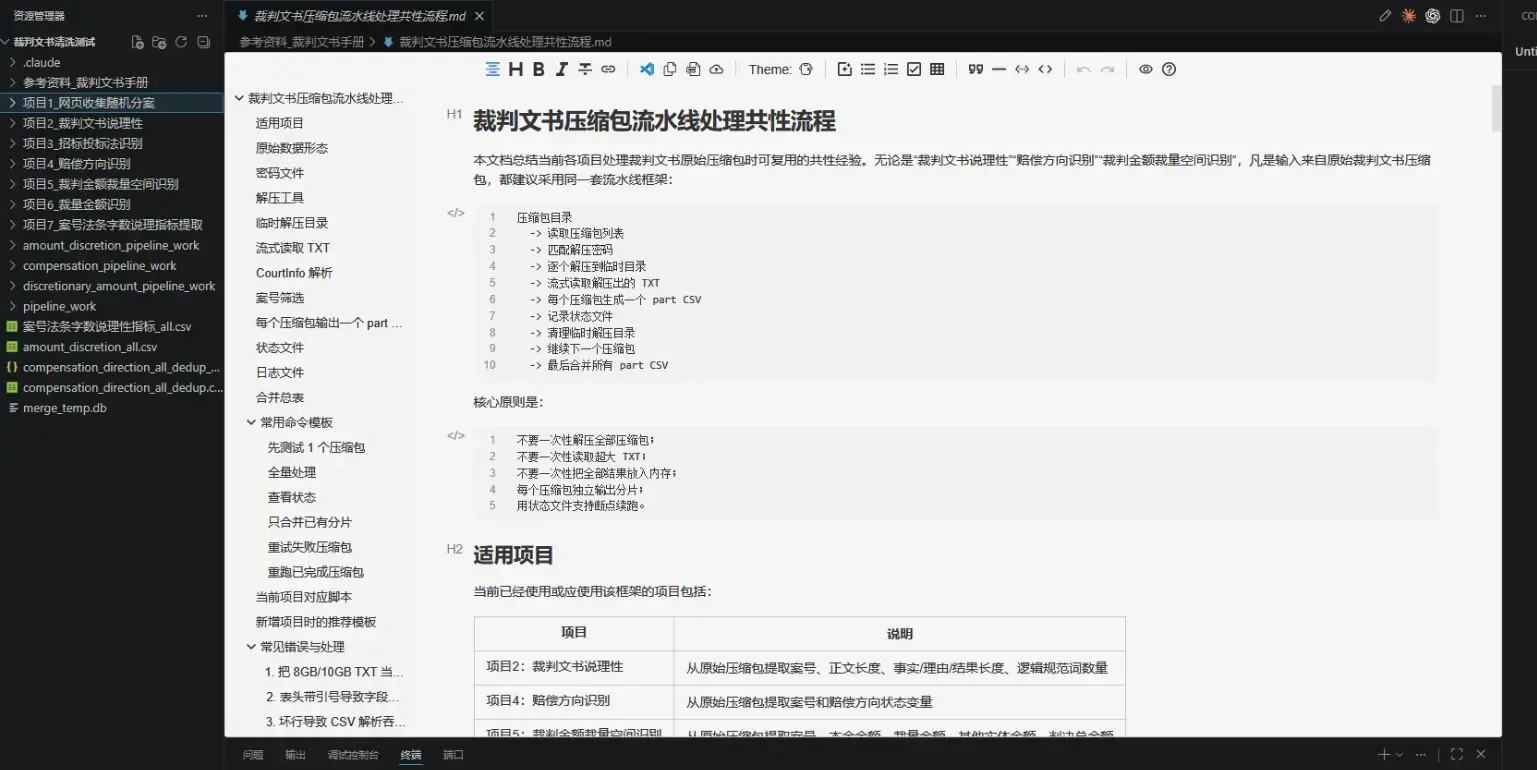
Another good habit is to promptly summarize into md documents. After doing a lot of work with AI, keeping these detail documents can improve the efficiency of AI programming.
As shown, this contains some of the data cleaning code I wrote for court judgments, all summarized into detailed documentation
Websites for court judgments
I don’t recommend querying cases on China Judgements Online, it lags and requires frequent verification.
💬
Note: Cleaning court judgments requires alternately handling Chinese characters and numbers. This document will cover several common Python and Stata regular expressions.
AI may know a lot of functions, but it doesn’t know how to combine them.
Understanding the algorithm of the overall design is our biggest advantage.
When asking questions, help AI sort out the algorithm of the code.
With AI around, knowing which package can achieve which function, and what role it plays under the algorithm, matters more than mastering the details.
Court Judgment Data Sources
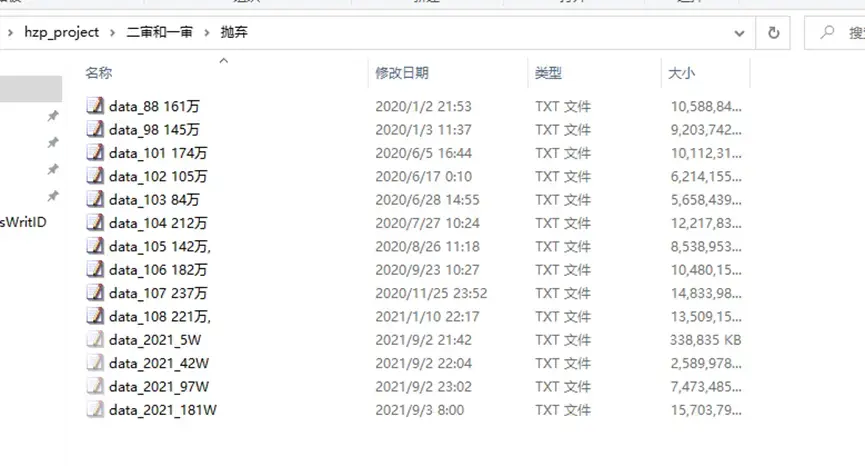
Raw text data: a pile of txt files. Each line is one court judgment record. The txt files are named after “万” (ten-thousand), so below we use the integer part of the number to refer to each txt file.
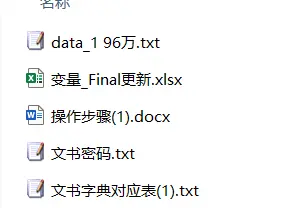
The accompanying documents are the archives, the document dictionary, and the variable-meaning table.
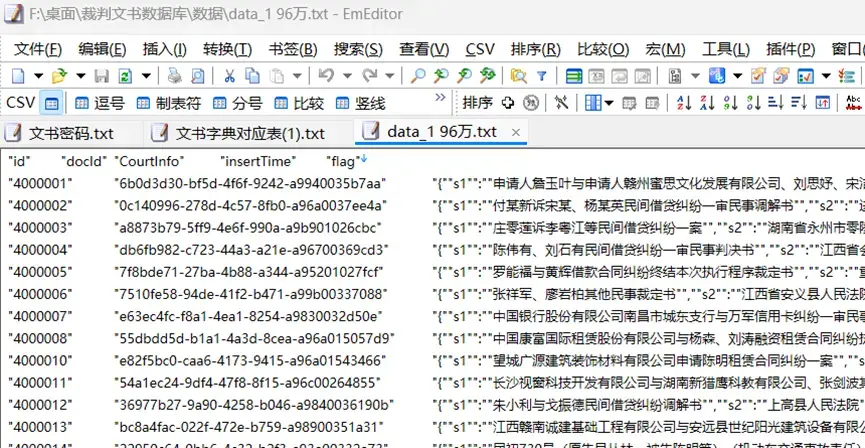
Example
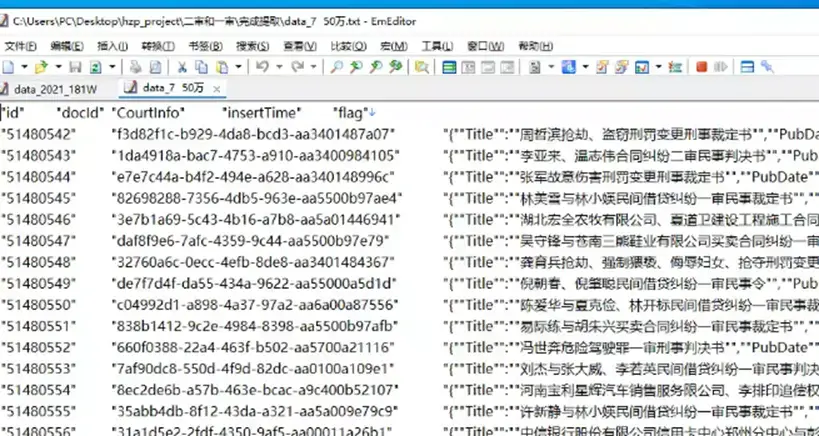
Tip😍: Each txt file is very large, and ordinary software usually can’t open them. I personally recommend using EmEditor to view them. Actively using EmEditor to look at examples lets us better understand the mojibake situation and the writing conventions of court judgments, so we can improve our text-processing code.
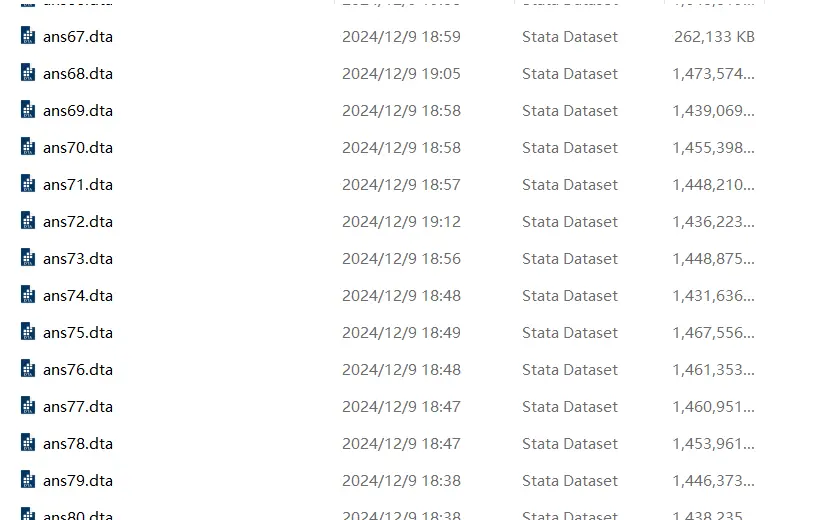
Dta data: Stata files already cleaned by predecessors. Split into ans 1–ans 83. Formatted as Stata .dta files.
Example
A complete cleaning pipeline is:
Filter and extract the information we need from the raw txt files, ultimately turning it into data that can be imported into Stata.
Processing the txt Files
Most of the court judgment txt files have already been converted to JSON format, so Python can read them fairly easily.
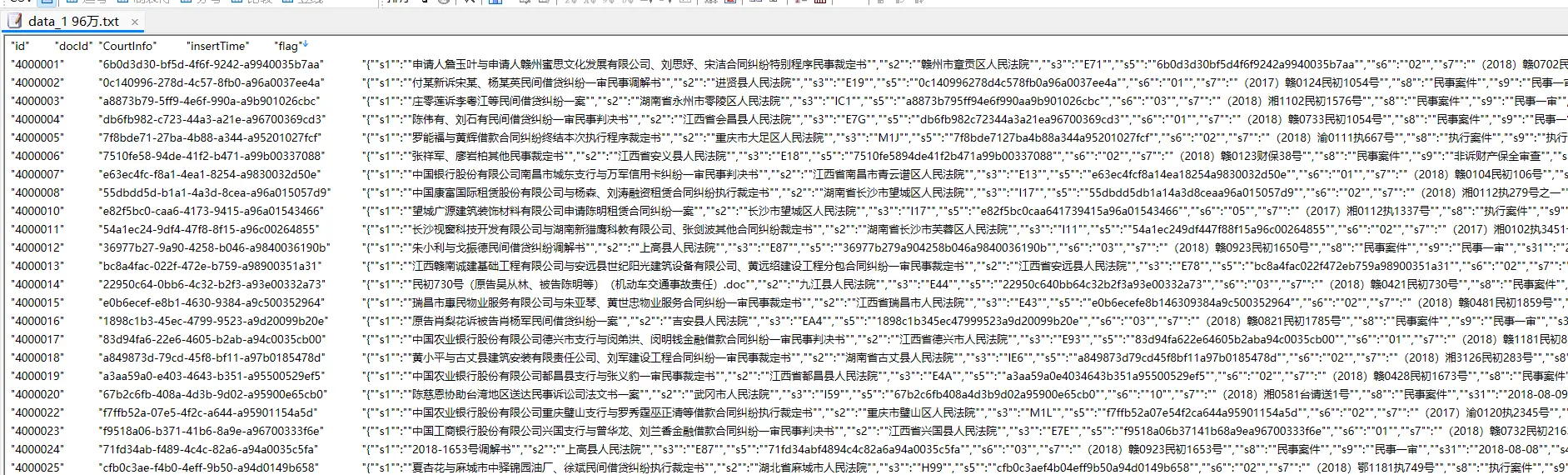
Most of the court judgment txt files use the s-series naming structure below:
The important information is all in the third column, inside the data structure contained in the s* series
The important information is all in the third column, inside the data structure contained in the s* series.
But getting one to three txt files to run through doesn’t mean all of them will run through.
⛔ Court judgment txt files also come in some other formats:
So when processing you need to consider code compatibility and comprehensiveness, write separate processing code, and then process such txt files twice.
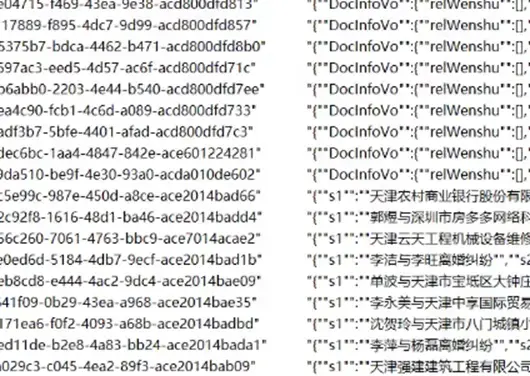
Example
Example
Some Suggestions
Since the loop is easily interrupted, when processing with txt I recommend referring to the following logic:
Process the mojibake txt files (attached later) separately from the s-series txt files.
The original files are txt; after cleaning, generate new cleaned_txt files.
Since the cleaning loop command is easily interrupted, it’s best to add one more command: compare the file names of the txt and cleaned_txt files.
Add one more step: move the processed txt documents to another folder, fix the erroring code, and continue the loop.
Python’s default file-reading order is txt 1, txt 10, txt 111… rather than 1, 2, 3…
Mojibake Documents
It’s not only the s-series txt files that have this:
Example
Python Example: Extracting the Case Number Sequence
Approach
Python reads the JSON format of the txt.
Extract the CourtInfo data from the third column.
Example
The s23 variable holds all case numbers, which we use to trace first instance, second instance, retrial, and final instance.
For example, (2016)沪0104民初33043号 is essentially the ID card number of a court judgment case.
Regular expression filtering: extract strings that satisfy the (year) chu\zhong\zai hao rule.
1
pattern=r"[((]\d{4}[))][^号]*?(?:初|终|再)[^号]*?号"
After extraction, remove duplicates and exclude case numbers containing “['X', 'x', 'X', '执', '不动产', '-', '第']”.
If you keep using this method to extract, it’s best to also add 辖 to the exclusions.
This kind of case number also has 辖初, 辖再, and 辖终, but they only indicate the division of a court’s jurisdiction.
(Maybe someone in the future can think of a way to use this feature for research? 👍)
1
exclusions=['X','x','X','执','不动产','-','第']
Sort, prioritizing sorting by the (year) in the case number. Delete all rows where the number of case numbers is greater than or equal to 5.
A case at most follows this order:
First instance, appeal if unsatisfied, retrial, final instance, appeal again if unsatisfied, final instance.
You can jump directly from first instance to final instance; after final instance there is one last chance for retrial, and after the retrial ends it generally won’t change again.
My personal sorting logic: (the biggest hole here is that I can’t think of how to perfectly identify the position of a “再” case number)
Generate four variables m1–m4. Case numbers containing 初 are classified into m1, case numbers containing 终 are classified into m3.
The cases with 再:
If there are only 初 and 再, the 再 is classified into m2.
If there is only 再, I put it in m4 by default.
If there are both 终 and 再, judge by relative position whether the 再 is m2 or m4.
Later I found that 【辖终】 interferes with the order, so first clear out the case numbers containing 辖, then swap the order with the 【终】 case number that got squeezed into m4.
This is the most troublesome part of big data:
If the earlier work isn’t done perfectly, the cost of redoing it later keeps rising. The worst part is — big data can rarely exhaust all possible mojibake.
Processing a Single txt
The following code only targets documents named with the s series.
importpandasaspdfromcollectionsimportOrderedDictimportjsonimportreimportos# Read the datadata=pd.read_csv("F:/桌面/裁判文书数据库/test/test.txt",delimiter='\t')# Check the first few rows of dataprint(data.head(3))# Assume the CourtInfo column contains JSON stringsjson_data=data['CourtInfo']# Parse the JSON datadefparse_json(json_str):try:returnjson.loads(json_str)exceptjson.JSONDecodeError:returnNone# Apply the parsing functionparsed_prac_c=json_data.apply(parse_json)# Convert the JSON dictionary to a DataFrame and handle missing valuesjson_df=pd.json_normalize(parsed_prac_c.dropna(how='all'))# Check the converted DataFrameprint(json_df.head(20))# Regular expression patternpattern=r"[((]\d{4}[))]\s*.*?号"# Use findall to extract all matchesmatches=json_df['s23'].apply(lambdax:re.findall(pattern,x)ifisinstance(x,str)else[])# Check the converted DataFrameprint(matches.head(3))print(matches)# Create a new DataFrame to save the updated 's23' columnmatches_df=pd.DataFrame({'s23':matches})# Check the converted DataFrameprint(matches_df.head(10))# print(matches_df)# Select the columns to concatenateselected_data_columns=[]selected_json_df_columns=[]# Concatenate the selected columnscombined_df=pd.concat([data[selected_data_columns],json_df[selected_json_df_columns],matches_df],axis=1)defclean_text(text):ifisinstance(text,list):text=', '.join(text)# Convert the list to a string, elements separated by comma and spaceifisinstance(text,str):iftext=="[]":return''cleaned_text=text.replace('[','').replace(']','').strip()returncleaned_textreturn''# Split and generate column namesdefsplit_and_rename(content):content=clean_text(content)split_content=content.split(', ')result={f'm{i+1}':split_content[i].strip()foriinrange(len(split_content))ifsplit_content[i].strip()}returnresult# Apply the functionexpanded_df=combined_df['s23'].apply(split_and_rename).apply(pd.Series)# Check the result# print("Expanded DataFrame:")# Function to extract the yeardefextract_year(text):match=re.search(r'[((](\d{4})[))]',text)returnint(match.group(1))ifmatchelsefloat('inf')# Cleaning and sorting functiondefclean_and_sort(row):# Filter out non-string valuesfiltered=[itemforiteminrowifisinstance(item,str)andnotany(keywordinitemforkeywordinexclusions)]# Remove duplicates while preserving orderunique_items=list(OrderedDict.fromkeys(filtered))# Sort by yearsorted_items=sorted(unique_items,key=lambdax:extract_year(x))returnsorted_items# List of keywords to excludeexclusions=['X','x','X','执','不动产','-','第']# Select all m* columnsm_columns=[colforcolinexpanded_df.columnsifcol.startswith('m')]# Apply the cleaning and sorting function to each rowdefprocess_row(row):# Get the content of the m* columnsrow_values=[row[col]forcolinm_columns]# Flatten the listflattened=[itemforsublistinrow_valuesforitemin(sublistifisinstance(sublist,list)else[sublist])]# Process and sortsorted_items=clean_and_sort(flattened)returnsorted_items# Apply to each row of the DataFramesorted_results=expanded_df.apply(process_row,axis=1)# Create a new DataFramemax_length=max(sorted_results.apply(len))sorted_df=pd.DataFrame(sorted_results.tolist(),columns=[f'm_sorted_{i+1}'foriinrange(max_length)])# Print the resultprint(sorted_df.head(10))# Concatenate to the original datacombined_df2=pd.concat([combined_df,sorted_df],axis=1)# Check the resultprint(combined_df.head(10))# Check whether the 'm_sorted_5' column exists, and drop non-empty rowsif'm_sorted_5'incombined_df2.columns:combined_df2_cleaned=combined_df2[combined_df2['m_sorted_5'].isna()|(combined_df2['m_sorted_5']=='')]else:# If the column doesn't exist, keep the original DataFramecombined_df2_cleaned=combined_df2.copy()# Print the resultprint(combined_df2_cleaned.head(10))# Get the names of all m_sorted_* columnsm_sorted_columns=[colforcolincombined_df2_cleaned.columnsifcol.startswith('m_sorted_')]# Filter out columns with index >= 5columns_to_drop=[colforcolinm_sorted_columnsifint(col.split('_')[2])>=5]# Drop the specified columnscombined_df2_cleaned=combined_df2_cleaned.drop(columns=columns_to_drop,errors='ignore')# Print the result to check the cleaned DataFrameprint(combined_df2_cleaned.head())combined_df2.to_csv('F:/桌面/combined_df.txt',sep='\t',index=False,quoting=1,quotechar='"')
Batch Processing
My personal batch-processing approach is to loop over all documents in a folder.
The loop is easily interrupted, so I suggest writing an error log and a command to move a document once it has been processed.
importpandasaspdfromcollectionsimportOrderedDictimportjsonimportreimportos# Define the input and output folder paths# Define the input and output folder pathsinput_folder_path="C:/Users/PC/Desktop/hzp_project/二审和一审/数据/"output_folder_path="C:/Users/PC/Desktop/hzp_project/二审和一审/清洗结果/"# Create the output folder if it doesn't existifnotos.path.exists(output_folder_path):os.makedirs(output_folder_path)# Iterate over all .txt files in the input folderforfilenameinos.listdir(input_folder_path):iffilename.endswith('.txt'):input_file_path=os.path.join(input_folder_path,filename)output_file_path=os.path.join(output_folder_path,filename)# Read the datadata=pd.read_csv(input_file_path,delimiter='\t')# Print the first 3 rows to checkprint(f"Processing file: {filename}")print(data.head(3))# Parse the JSON fieldjson_data=data['CourtInfo']defparse_json(json_str):try:returnjson.loads(json_str)exceptjson.JSONDecodeError:returnNoneparsed_prac_c=json_data.apply(parse_json)# Convert the parsed JSON to a DataFramejson_df=pd.json_normalize(parsed_prac_c.dropna(how='all'))# Print the first 20 rows to checkprint(json_df.head(20))# Define the matching patternpattern=r"[((]\d{4}[))]\s*.*?号"# Find the matchesmatches=json_df['s23'].apply(lambdax:re.findall(pattern,x)ifisinstance(x,str)else[])# Print the first 3 matches to checkprint(matches.head(3))print(matches)# Convert the matches to a DataFramematches_df=pd.DataFrame({'s23':matches})# Print the first 10 rows of the matches DataFrame to checkprint(matches_df.head(10))# Select the data columns to keepselected_data_columns=[]selected_json_df_columns=[]# Concatenate the original data, parsed JSON data, and match resultscombined_df=pd.concat([data[selected_data_columns],json_df[selected_json_df_columns],matches_df],axis=1)# Text cleaning functiondefclean_text(text):ifisinstance(text,list):text=', '.join(text)ifisinstance(text,str):iftext=="[]":return''cleaned_text=text.replace('[','').replace(']','').strip()returncleaned_textreturn''# Split and rename functiondefsplit_and_rename(content):content=clean_text(content)split_content=content.split(', ')result={f'm{i+1}':split_content[i].strip()foriinrange(len(split_content))ifsplit_content[i].strip()}returnresult# Expand the match resultsexpanded_df=combined_df['s23'].apply(split_and_rename).apply(pd.Series)# Function to extract the yeardefextract_year(text):match=re.search(r'[((](\d{4})[))]',text)returnint(match.group(1))ifmatchelsefloat('inf')# Cleaning and sorting functiondefclean_and_sort(row):filtered=[itemforiteminrowifisinstance(item,str)andnotany(keywordinitemforkeywordinexclusions)]unique_items=list(OrderedDict.fromkeys(filtered))sorted_items=sorted(unique_items,key=lambdax:extract_year(x))returnsorted_items# List of exclusion keywordsexclusions=['X','x','X','执','不动产','-','第']# Get the names of all columns starting with mm_columns=[colforcolinexpanded_df.columnsifcol.startswith('m')]# Process each rowdefprocess_row(row):row_values=[row[col]forcolinm_columns]flattened=[itemforsublistinrow_valuesforitemin(sublistifisinstance(sublist,list)else[sublist])]sorted_items=clean_and_sort(flattened)returnsorted_itemssorted_results=expanded_df.apply(process_row,axis=1)# Compute the maximum length and create a new sorted DataFramemax_length=max(sorted_results.apply(len))sorted_df=pd.DataFrame(sorted_results.tolist(),columns=[f'm_sorted_{i+1}'foriinrange(max_length)])# Concatenate the data againcombined_df2=pd.concat([combined_df,sorted_df],axis=1)# Filter conditionif'm_sorted_5'incombined_df2.columns:combined_df2_cleaned=combined_df2[combined_df2['m_sorted_5'].isna()|(combined_df2['m_sorted_5']=='')]else:combined_df2_cleaned=combined_df2.copy()# Print the first 10 rows of cleaned data to checkprint(combined_df2_cleaned.head(10))# Get the names of all columns starting with m_sortedm_sorted_columns=[colforcolincombined_df2_cleaned.columnsifcol.startswith('m_sorted_')]# Column names to dropcolumns_to_drop=[colforcolinm_sorted_columnsifint(col.split('_')[2])>=5]# Drop the unneeded columnscombined_df2_cleaned=combined_df2_cleaned.drop(columns=columns_to_drop,errors='ignore')# Print the final first few rows to checkprint(combined_df2_cleaned.head())# Save to filecombined_df2_cleaned.to_csv(output_file_path,sep='\t',index=False,quoting=1,quotechar='"')print("Processing complete.")
Python Example: Extracting Legal Provisions and Moving Folders
The number of legal provisions can measure case complexity, and the provisions themselves also measure the case type.
The s47 series of the txt documents corresponds to the legal provisions of the judgment, and inside it is a second-level JSON format:
importpandasaspdimportjsonimportreimportosimportglobimportlogging# Configure logginglogging.basicConfig(level=logging.INFO,format='%(asctime)s - %(levelname)s - %(message)s')# Explicitly specify the input and output folder pathsinput_folder_path="C:/Users/PC/Desktop/hzp_project/二审和一审/数据/"output_folder_path="C:/Users/PC/Desktop/hzp_project/二审和一审/清洗结果/"log_folder_path="C:/Users/PC/Desktop/hzp_project/二审和一审/日志/"# Make sure the output and log folders existos.makedirs(output_folder_path,exist_ok=True)os.makedirs(log_folder_path,exist_ok=True)# Parse JSON datadefparse_json(json_str):try:ifisinstance(json_str,str):returnjson.loads(json_str)elifisinstance(json_str,list):returnjson_strelse:logging.warning(f"未知数据类型: {type(json_str)}")returnNoneexceptjson.JSONDecodeError:logging.warning(f"JSON 解析失败: {json_str}")returnNone# Count Chinese charactersdefcount_chinese_chars(text):ifpd.isnull(text):return0returnlen(re.findall(r'[\u4e00-\u9fff\u0030-\u0039\u3000-\u303f\uff00-\uffef]',str(text)))# Extract and format clausesdefextract_clauses(s47_data):formatted_clauses=[]foritemins47_data.dropna():data=parse_json(item)ifdataisnotNone:clauses=set()# Use a set to deduplicateforclauseindata:fgmc=clause.get('fgmc','')tkx=clause.get('tkx','')match=re.search(r'(第.*?条)',tkx)ifmatch:clauses.add(f"{fgmc}{match.group(1)}")formatted_clauses.append(list(clauses))# Save the clauses extracted per rowelse:formatted_clauses.append([])# If parsing fails, add an empty listreturnformatted_clauses# Process a single filedefprocess_file(input_file,output_folder,log_folder,total_rows):# Initialize an empty list to store error infoerror_logs=[]defbad_line_handler(bad_line):error_logs.append((input_file,bad_line.line_num,bad_line.line))# Read the datatry:data=pd.read_csv(input_file,delimiter='\t',on_bad_lines=bad_line_handler,engine='python')logging.info(f"Read {len(data)} rows from file: {input_file}")exceptExceptionase:logging.error(f"Error reading file: {input_file}")logging.error(f"Error message: {e}")return# Filter out rows where the CourtInfo column starts with "DocInfoVo" or cannot be parsed as JSONdata=data[data['CourtInfo'].apply(lambdax:x.startswith('{"s1":')ifpd.notnull(x)elseFalse)]data=data[data['CourtInfo'].apply(lambdax:isinstance(parse_json(x),dict))]logging.info(f"Filtered out invalid rows from file: {input_file}")# Extract the JSON datajson_data=data['CourtInfo']# Apply the parsing functionparsed_prac_c=json_data.apply(parse_json)logging.info(f"Parsed JSON data from file: {input_file}")# Convert the JSON dictionary to a DataFrame and handle missing valuesjson_df=pd.json_normalize(parsed_prac_c.dropna(how='all'))logging.info(f"Normalized JSON data from file: {input_file}")# Select specific columnsselected_columns=json_df[['s7','s23','s25','s26','s27','s47']].copy()# Use .copy() to create a copy# Count occurrences of the character "条" in the s26 columnselected_columns['count_tiao']=selected_columns['s26'].apply(lambdax:x.count('条')ifpd.notnull(x)else0)logging.info(f"Calculated 'count_tiao' from file: {input_file}")# Compute the total character count of the s23, s25, s26, s27 columnsselected_columns['total_chars']=selected_columns[['s23','s25','s26','s27']].apply(lambdarow:sum(count_chinese_chars(x)forxinrow),axis=1)logging.info(f"Calculated 'total_chars' from file: {input_file}")# Extract and format clausesunique_clauses=extract_clauses(selected_columns['s47'])selected_columns['unique_clauses']=unique_clauses# Use .loc for safe assignmentselected_columns['clause_count']=[len(clauses)forclausesinunique_clauses]# Number of clauses per rowlogging.info(f"Extracted and formatted clauses from file: {input_file}")# Generate the output file namebase_name=os.path.basename(input_file)output_file=os.path.join(output_folder,f"cleaned_{base_name}")# Save the result as a txt fileselected_columns[['s7','count_tiao','total_chars','unique_clauses','clause_count']].to_csv(output_file,sep='\t',index=False,quoting=1,quotechar='"')logging.info(f"Processed and saved to: {output_file}")# Report progressprocessed_rows=len(data)logging.info(f"已完成处理文件: {base_name}, 条目数: {processed_rows}/{total_rows}")# Save the error logiferror_logs:log_file=os.path.join(log_folder,f"error_log_{base_name}.txt")withopen(log_file,'w',encoding='utf-8')asf:forloginerror_logs:f.write(f"File: {log[0]}, Line: {log[1]}, Content: {log[2]}\n")logging.info(f"Error logs saved to: {log_file}")# Iterate over all files in the input folderall_files=glob.glob(os.path.join(input_folder_path,"*.txt"))total_files=len(all_files)processed_files=0ifnotall_files:logging.warning("No files found in the input folder.")else:forinput_fileinall_files:processed_files+=1# Report the progress of the current filelogging.info(f"正在处理文件: {input_file} ({processed_files}/{total_files})")process_file(input_file,output_folder_path,log_folder_path,total_files)
Moving txt Files
Because the code loop is very easily interrupted, I recommend setting up three folders:
The raw folder holds the raw data.
The results folder holds the processed data, uniformly renamed to cleaned_* txt names.
The cleaned folder: put the raw data that has finished cleaning here, so that after the loop is interrupted you can resume from where you left off.
So the logic of this code is to compare the cleaned folder against the raw folder and move the txt documents whose names have a match.
importosimportshutil# Define the folder pathssource_folder=r'F:/桌面/测试/清洗结果'data_folder=r'F:/桌面/测试/数据'cleaned_folder=r'F:/桌面/测试/完成提取'# Get all .txt file names in the source folder (without paths), remove the "cleaned_" prefix, strip all extra spaces, and convert to lowercasedefstandardize_filename(filename):return''.join(filename.split()).lower()# Get the file names in the source foldersource_files=[fforfinos.listdir(source_folder)iff.startswith('cleaned_')andf.endswith('.txt')]standardized_source_files={standardize_filename(f[8:]):fforfinsource_files}# Get the file names in the data folderdata_files=[fforfinos.listdir(data_folder)iff.endswith('.txt')]standardized_data_files=set(standardize_filename(f)forfindata_files)# Find files in the data folder that also exist in the source foldercommon_files=standardized_source_files.keys()&standardized_data_files# Move the matching files to the cleaned folderforfilenameincommon_files:original_filename=standardized_source_files[filename]source_path=os.path.join(data_folder,original_filename.replace('cleaned_',''))destination_path=os.path.join(cleaned_folder,original_filename.replace('cleaned_',''))# Make sure the destination folder existsos.makedirs(os.path.dirname(destination_path),exist_ok=True)shutil.move(source_path,destination_path)print(f"Moved: {source_path} -> {destination_path}")print("Process completed.")
Example: Re-sorting the Court Judgment Index
The earliest first-instance case number goes first (m_sorted_1)
The latest final-instance case number goes last (m_sorted_3)
Retrial cases are arranged as “earliest before final instance, latest after final instance” (m_sorted_2, m_sorted_4)
The remaining case numbers fill the gaps in chronological order (m_sorted_5)
importpandasaspdfromdatetimeimportdatetimedefparse_date(year_str,month_str):"""将年份、月份字符串转换为日期对象,若转换失败返回 None"""try:year=int(year_str)month=int(month_str)ifmonth_strandmonth_str.strip()!=""else1returndatetime(year,month,1)exceptException:returnNonedefreorder_row(row):# List of extra fields to move together (associated variables other than m_sorted_i)extra_fields=['court','court_name','jud_year','jud_month','win','judge_am','judge_fin']entries=[]# Iterate over the original 5 groups of data, constructing each group's entry (only when both m*_judge_am and m*_jud_year have values is the group considered valid)foriinrange(1,6):judge_am=row.get(f"m{i}_judge_am")jud_year=row.get(f"m{i}_jud_year")ifpd.isna(judge_am)orpd.isna(jud_year)orjudge_am==""orjud_year=="":continuecase_str=row.get(f"m_sorted_{i}")ifnotcase_strorpd.isna(case_str):continuejud_month=row.get(f"m{i}_jud_month")dt=parse_date(jud_year,jud_month)# Judge the case-number typeif"初"incase_str:typ="chu"elif"终"incase_str:typ="zhong"elif"再"incase_str:typ="zai"else:typ="other"# Collect other related fieldsfields_data={}forfieldinextra_fields:col_name=f"m{i}_{field}"fields_data[field]=row.get(col_name,"")entry={"orig_index":i,# Original group number"case":case_str,# Case-number string"date":dt,# Converted date (may be None)"type":typ,# Case-number type: chu / zhong / zai / other"fields":fields_data}entries.append(entry)# If there are no valid entries, return all new groups as emptyifnotentries:returnpd.Series({f"m_sorted_{i}":""foriinrange(1,6)})# Locate "初": take the earliest date among all entries containing "初"chu_entries=[eforeinentriesife["type"]=="chu"ande["date"]isnotNone]initial_entry=min(chu_entries,key=lambdae:e["date"])ifchu_entrieselseNone# Locate "终": take the largest date among all entries containing "终"zhong_entries=[eforeinentriesife["type"]=="zhong"ande["date"]isnotNone]terminal_entry=max(zhong_entries,key=lambdae:e["date"])ifzhong_entrieselseNone# Get all "再" entrieszai_entries=[eforeinentriesife["type"]=="zai"ande["date"]isnotNone]# Initialize the dictionary of new sorting positions, representing the entries finally placed in m_sorted_1 to m_sorted_5new_positions={1:None,2:None,3:None,4:None,5:None}# m_sorted_1 always holds the "初" caseifinitial_entry:new_positions[1]=initial_entryifterminal_entry:# If a final case exists, m_sorted_3 is fixed to hold the final casenew_positions[3]=terminal_entry# Group: "再" before the final casere_before=[eforeinzai_entriesife["date"]<terminal_entry["date"]]# Group: "再" after the final casere_after=[eforeinzai_entriesife["date"]>terminal_entry["date"]]# Take the earliest "再" with a date before the final case into m_sorted_2 if re_before:new_positions[2]=min(re_before,key=lambdae:e["date"])# Take the latest "再" with a date after the final case into m_sorted_4 if re_after:new_positions[4]=max(re_after,key=lambdae:e["date"])else:# If no final case exists, i.e. only "初" and "再"zai_sorted=sorted(zai_entries,key=lambdae:e["date"])iflen(zai_sorted)==1:new_positions[2]=zai_sorted[0]eliflen(zai_sorted)>=2:# Earliest into m_sorted_2, latest into m_sorted_4 new_positions[2] = zai_sorted[0]new_positions[4]=zai_sorted[-1]# Fill the remaining unassigned entries (including type other or unselected) into remaining gaps (e.g. m_sorted_5) after sorting by dateassigned_indices={e["orig_index"]foreinnew_positions.values()ifeisnotNone}remaining=[eforeinentriesife["orig_index"]notinassigned_indices]remaining_sorted=sorted(remaining,key=lambdae:e["date"]ife["date"]isnotNoneelsedatetime.max)forposin[2,5]:ifnew_positions[pos]isNoneandremaining_sorted:new_positions[pos]=remaining_sorted.pop(0)# Construct the returned Series: write m_sorted_i and the associated fields by new group number 1-5result={}fornew_groupinrange(1,6):ifnew_positions[new_group]:entry=new_positions[new_group]result[f"m_sorted_{new_group}"]=entry["case"]forfieldinextra_fields:result[f"m{new_group}_{field}"]=entry["fields"].get(field,"")else:result[f"m_sorted_{new_group}"]=""forfieldinextra_fields:result[f"m{new_group}_{field}"]=""returnpd.Series(result)# Read the data (note the raw string in the path to avoid backslash-escaping problems)df=pd.read_csv(r"C:\Users\PC\Desktop\案号排序.txt",sep=",",dtype=str)# Call reorder_row on each row to get the re-sorted m* series datadf_new=df.apply(reorder_row,axis=1)# Update the re-sorted variables back into the original DataFrame (including m_sorted_1 to m_sorted_5 and each group's associated fields)forcolin[f"m_sorted_{i}"foriinrange(1,6)]:df[col]=df_new[col]fornew_groupinrange(1,6):forfieldin['court','court_name','jud_year','jud_month','win','judge_am','judge_fin']:col_name=f"m{new_group}_{field}"df[col_name]=df_new[col_name]# Save the result to a new filedf.to_csv(r"C:\Users\PC\Desktop\结果_案号排序.txt",index=False)
Matching the dta Data
About Case Numbers
The case numbers of court documents are divided into ruling documents, judgment documents, and other documents (supervision, enforcement, guarantee…).
Ruling documents concern procedural matters, for example this matter shouldn’t be handled by court xx and is transferred to court xx.
Judgment documents concern substantive matters, i.e., the final result of the judgment.
Note! Judgment documents and court documents may share the same case number!
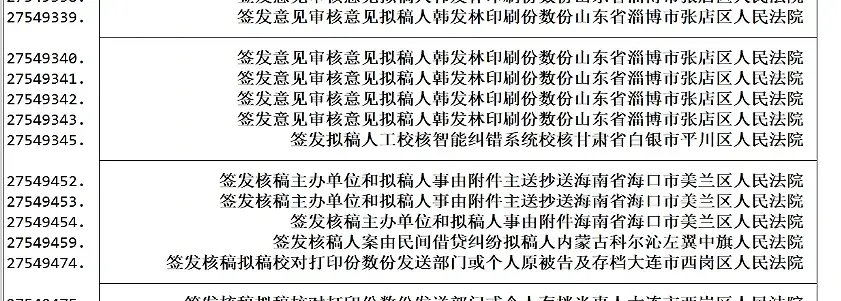
Here I’ll also share some bizarre court judgment case numbers I’ve seen personally; some of the strange symbols may be because someone else already used that number and added symbols to distinguish them.
Because of the issue with Chinese vs. English parentheses, I recommend removing the parentheses. But I don’t recommend filtering by keeping only Chinese characters and digits, since in many cases the short dashes and mysterious characters also carry identifying information.
After the txt extraction is complete, it’s converted to .dta and matched into ans*.dta.
The case number is the theoretical unique identifier, but in practice duplicates may occur.
In this case I recommend the following logic: first iterate over all variables, generate the total number of non-missing values, de-duplicate, and among the duplicate rows of a case number keep the row with the most non-missing values:
The text format of the ans*.dta series is all strL, meaning long string. Stata string matching can only use string formats with a specific length, so we can change the variable format by truncating characters.
🔊 Important: Note that the placeholder widths of English characters and Chinese characters are different.
For example, “民初 730 号” — although it’s only six characters, it may actually occupy 15 positions.
If we only truncate to a length of 6, the variable becomes mojibake.
The longest case-number placeholder I’ve observed is about 39 positions, and for robustness I simply chose to truncate to 88 characters.
This also means: we need to convert after cleaning out the strange symbols in the text.
For example, some court names are like “广西壮族自治区柳州市鱼峰区人民法院”
# Truncate charactersgenjudge_fin2=substr(judge_fin,1,45)gencourt_name2=substr(court_name,1,88)dropjudge_fincourt_namerenamejudge_fin2judge_finrenamecourt_name2court_name# Clean case numbers longer than a certain character count, e.g. 66, to emptyforeachvarofvarlists7m_sorted_1m_sorted_2m_sorted_3m_sorted_4{gencase_length=strlen(`var')summarizecase_lengthreplace`var' = "" if case_length > 66dropcase_length}
Choosing the Matching Command
Many (base table) to one: use the merge command directly.
One (base table) to many: for example, txt has some duplicate records, but the missing values differ across rows. We can use merge’s append matching update nogen force, which only matches variables onto missing values in that row; the non-missing parts are left unchanged.
1
2
3
4
5
6
7
8
clear
forvalues j = 1/83 {
    use "D:\数据合集\原始数据\ans`j'.dta", clear
    merge 1:m case_wid_str using "C:\Users\PC\Desktop\hzp_project_re\一审二审数据匹配\排序\面板数据\all.dta", update nogen force
    drop if case_wid == ""
duplicates drop case_wid_str , force
    save "C:\Users\PC\Desktop\hzp_project_re\一审二审数据匹配\排序\面板数据\ans`j'.dta", replace
}
For many-to-many (base table) matching: merge is no longer suitable here; I recommend joinby.
When we write loop matching commands, the numbers may have gaps, e.g. data 1, data 3, data 5, data 7…
You could use Python to directly rename the files in order, but that easily destroys the meaning of the naming.
Here I provide a Stata natural-number loop command I wrote:
Of course, you could scan the folder for all file names, identify them, and loop over them. But if there are some files that need manual exclusion, you can refer to this code.
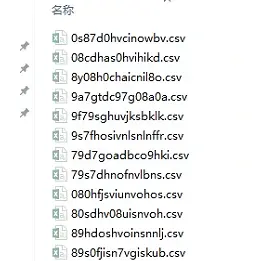
But what if the file names are complete mojibake? If the file names have no spaces or special symbols, you can read the file names into a local and add them to the loop. This is also a more general-purpose piece of code.
For example, the following mojibake:
As shown
We can use Stata’s fs package to read all the names.
Then use a local to store the names directly for the loop.
During the loop we can nest another loop so that new files are named in order.
Normal matching would be to match the dta files converted from the 119 txt files, nested-loop matching them onto ans 1–ans 83.
If you match with direct nested loops, it might take 4 to 5 days.
The reason the matching takes so long is that each nested loop’s file reading takes too long, and there are duplicate values across files.
I recommend first using the append command to vertically stack the 119 dta files together, then loop-matching them onto ans 1 to ans 83. This way the entire match takes at most 2 days.
💬 Note: The office computer runs the Stata MP version, whose feature is that "computation speed is allocated based on the computer's cores." The CPU currently has a full 16 cores, and the largest peak I've personally processed is 60 GB. It's basically fine — you just need patience while waiting through the occasional stalls.
Cleaning the dta Data
Common Text-Processing Functions
Removing Spaces
For example, the chief judge (judge) variable can appear as 四川 大学, 四川大学, or 四 川 大 学.
Different websites use different space characters, so I recommend the following function:
Remove all special characters, including invisible characters, whitespace, and punctuation.
Keep a row if the variable contains a specific character.
1
keepifstrpos(var,"民初")>0
If there are two variables, e.g. one is a standardized province variable a (四川省, 内蒙古自治区) and the other is a non-standardized province variable b (四川, 内蒙古), and you want to judge whether variable a contains variable b, you can use:
1
gen localed = strpos(a, b) > 0
Removing Special Characters
The text variables in Ans 1 through Ans 83 are mixed with various non-Chinese symbols; you can use the following function to remove them:
Below are the mojibake symbols I’ve personally filtered out.
💬 Note: Why insist on the exclusion method rather than keeping only Chinese characters? Because when I tried it myself, I found some Chinese variables would turn into mojibake that way.
1
2
3
4
5
6
7
# Define the list of symbols to remove (including spaces)
local symbols "ⅩⅩⅩ X ? ; ;, 《 》 . + ( ) ( ) & # 1 2 3 4 5 6 7 8 9 0 & A-Z a-z ;? * ︰ ++  .   XX XXX   ______   ` - +  BRR H imestimes jzwjzwnjzwnjzwjzwnjzwnjzwnjzwjzwjzwjzwnjzwnjzwnjzwjzwnjzwnj jzwnjzwjzwjzwnjzwnjzwnjzwnjzwnjzwjzwjzwjzwnjzwjzwnjzwjzwj spemsp sp emsp ;; *  XX XXX X XXX"

* Iterate over the symbol list and remove each symbol and spaces
foreach s of local symbols {
    replace judge_fin = subinstr(judge_fin, "`s'", "", .)
}
Paper Labels
Sometimes Stata data only has variable names, while a separate Excel sheet stores the label values.
How do you read the Excel file and automatically batch-generate label variable commands?
This will generate a file storing all the labeling commands for Stata.
All code involves a tradeoff between automation and transparency; I personally prefer this kind of process with an intermediate artifact, which is easier to check and correct.
Regular Expression Extraction
Character Filtering
Take the chief judge text variable as an example.
The variable should clearly be a name, but instead a whole paragraph shows up.
Zhang San people’s entrusted, Zhang San presided over the trial in 2014, Zhang San people’s assessor made the ruling, Zhang San acting chief judge conducted the hearing, Zhang San and Li Si clerks opened the session……
Another example — the court variable
In other words, the correct text characters should be the first few characters before a specific word.
First use character-length filtering to look at the text format:
Since the crawler sometimes hits website encryption, the crawled result is 陈*, and after the above cleaning only 陈 remains. The function command to delete single-character rows is:
1
2
*Delete rows with only one character, e.g. originally *陈
drop if ustrregexm(judge_fin, "^[\p{Han}]$")
Extracting Numbers
For example, the data shows 2.34435元 (needs to be a string variable), and we only want to extract the number; you can use the following code.
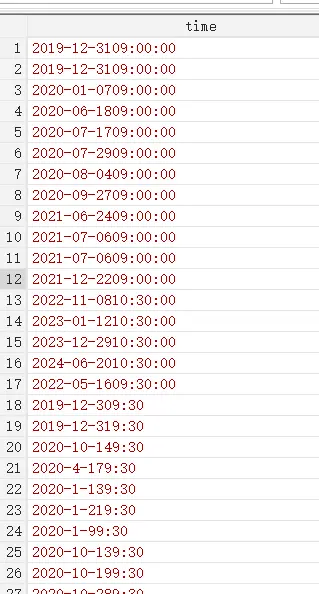
In the bidding work in my research group, many time formats are messy.
For example, two standard ones:
2019-12-31 09:00:00,
2019/12/30 09:30
But you’ll also see 20220516 09:30:00, 2022051609:30:00, 2022051609:30.
For example, missing seconds, or the month position written as 4 instead of 04.
As shown
The code below handles this set of time encodings in a unified way.
Some preprocessing to convert Chinese symbols to English ones.
When there’s no space between the date and time (e.g. 2022051609:30:00), if the value falls within the corresponding year/month range (e.g. 0-31), prefer taking two digits; if it exceeds the range, take the single digit before it.
Finally, time extraction that is compatible with various formats.
/*-----------------------------------------
  Date extraction and conversion scheme (compact-format enhanced version)
  Version: 2.6
  Last updated: 2024-06-27
-----------------------------------------*/
version 17
clear all
set more off

use "F:\桌面\test.dta", clear
keep time

*===============================
*        Preprocessing stage (enhanced)
*===============================
// Basic cleaning
replace time = ustrtrim(time)
replace time = subinstr(time, char(92), "-", .)
replace time = subinstr(time, ":", ":", .)
replace time = subinstr(time, " ", "", .)

*===============================
*      New compact-format recognition module
*===============================
// Recognize YYYYMMDD- format (core improvement)
gen str8 compact_date = ""
replace compact_date = substr(time, 1, 8) ///
    if ustrregexm(time, "^\d{8}-")  // Strictly match 8 digits + hyphen format

// Separate the compact-format data
preserve
keep if compact_date != ""
gen date_stata = date(compact_date, "YMD")
format date_stata %tdCCYY-NN-DD
tempfile compact
save `compact'
restore

// Process the non-compact-format data
keep if compact_date == ""
drop compact_date

*===============================
*      Original processing flow (optimized)
*===============================
// Unify the separator handling
foreach s in "." "_" "/" {
    replace time = subinstr(time, "`s'", "-", .)
}

// Extract the date part
gen str50 date_part = ustrregexs(1) if ustrregexm(time, "(\d{4}-\d{1,2}-\d{2,})[^\d]")
replace date_part = time if missing(date_part)

// Smart date handling
gen str4 year = ustrregexs(1) if ustrregexm(date_part, "^(\d{4})-\d+")
gen str2 month = ustrregexs(1) if ustrregexm(date_part, "-(\d{1,2})-")
gen str5 raw_day = ustrregexs(1) if ustrregexm(date_part, "-(\d+)$")

replace month = cond(strlen(month) == 1, "0" + month, month)
replace month = "12" if real(month) > 12

gen str2 day = substr(raw_day,1,2)
replace day = substr(day,1,1) if real(day) > 31
replace day = "31" if real(day) > 31
replace day = "0" + day if real(day) < 10 & strlen(day) == 1

replace date_part = year + "-" + month + "-" + day
drop year month raw_day day

gen date_stata = date(date_part, "YMD")
replace date_stata = date(ustrregexra(time, "[^0-9]", ""), "YMD") if missing(date_stata)

*===============================
*      Merge the processing results
*===============================
append using `compact'

*===============================
*      Post-processing and verification
*===============================
format date_stata %tdCCYY-NN-DD
Case Number and Date
In court documents, the acc year-month represents the filing year-month; the jud year-month represents the judgment year-month. Since the case number is assigned when the case is filed and accepted, if the filing year-month is missing, we can try to interpolate based on the case number. Each year the case numbers run from number 1 to number n, so we can interpolate the date based on that.
The case number (2019)沪0115民初1号 actually means: in 2019, the court with Shanghai code 0115 filed a case under the 民初 procedure, and it was the first filed case of the Shanghai–this court–民初 type that year.
Likewise, we can estimate the annual publication rate of court judgments based on this. But under maximum likelihood estimation, with an optimal approximate distribution assumption, we need to use the “tank formula” to estimate it.
**********Approach*************/*
Since case numbers each year are
民初(2020)**号, where **号 is numbered in order.
It's possible the sample only contains numbers 1, 3, 5, 7.
The "tank formula" derived from maximum likelihood estimation is used to estimate the publication rate (originating from WWII estimation of tank capture rates).
Finally, compute the publication rate for each court-year.
Consider dropping courts with low publication rates (equivalent to dropping regions with low publication rates).
*/**********VariableDescriptions*************/*
case_num_str: court judgment case number
court_name: court name
jud_year: judgment year
public_rate: publication rate
*/**********References*************/*
1 Origin of the formula, and other methods for estimating the publication rate
Augmenting serialized bureaucratic data: the case of Chinese courts (2022, working paper)
2 Application example
Suing the government under weak rule of law: Evidence from administrative litigation reform in China (2023, jpube)
*/gencase_num_str=ustrregexs(1)ifustrregexm(case_wid_str,"民[^0-9]*([0-9]+)")replacecase_num_str=ustrregexra(case_num_str,"^0+","")destringcase_num_str,gen(case_num)dropcase_num_strordercase_wid_strcase_numbysortcourt_namejud_year:egenmax_case_num=max(case_num)bysortcourt_namejud_year:gencase_count=_Nordermax_case_Nbysortcourt_namejud_year:egenmax_case_N=max(case_count)gencase_count=max_case_numgenpublic_rate=max_case_N/(max_case_num*(1+1/max_case_N)-1)sumpublic_ratekeepcourt_namejud_yearpublic_rateduplicatesdropcourt_namejud_year,forceduplicatesreportcourt_namejud_year
Reminder
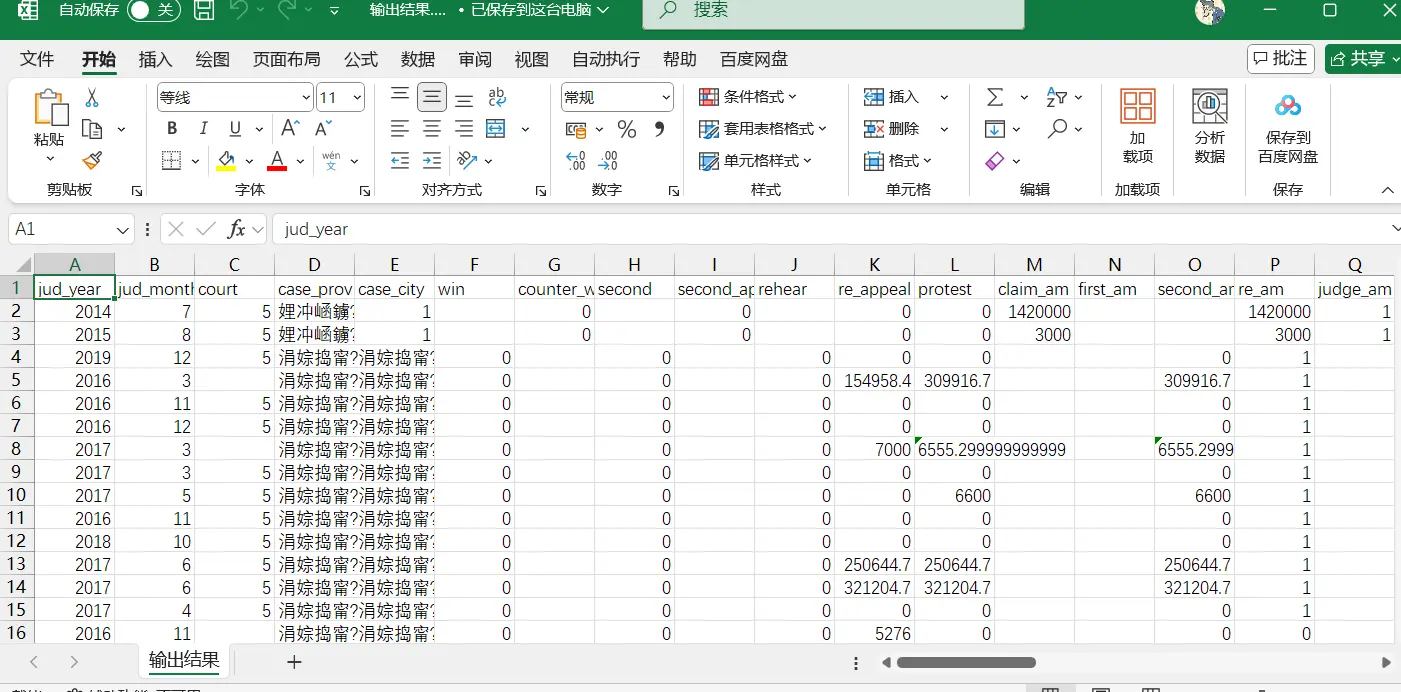
I recommend first exporting the Stata data to csv format.
The biggest problem is mojibake.
As shown
The csv is mojibake, because the extracted txt is not in utf-8 format.
😨 Note: Make sure the CSV file's default format is UTF-8 before processing.
Python Example: Extracting Past and Present Feature Means of Appealing Judges
Example 3 matches row by row, but this is simply too slow.
Now I want to process it like this:
Extract the 20 cases the judge handled before the appeal and compute the fine mean; at the same time, extract the 20 cases the judge handled after the appeal and compute the fine mean.
The algorithm logic I designed is as follows:
Group the data by the court–judge combination.
Each record has times from first instance to final instance, forming timestamps, and each row should identify the earliest and latest times in a series of times.
When the earliest time differs from the latest time, this record is main data.
Within each group, keep only the samples that satisfy the condition.
Around the main data, when there are still 10 cases before the main data’s earliest record and 10 cases after it, keep only these 21 records in the end.
If a group has multiple cases at the same time, keep all samples that satisfy the requirement.
Generate variable a for the main data that has the corresponding number of surrounding cases, marking it as 1.
Generate the before-appeal and after-appeal variables, and compute the mean of the corresponding number of cases.
Breaking down the code
To make better use of AI, I actually split this algorithm into two steps. The first part filters out all samples that meet the requirement; the second part computes the means of the cases before and after at the main data (a=1). Finally, integrate the code from the two parts.
In the end I set one more parameter: how many surrounding cases the main case needs to have for it to be kept.
importpandasaspdfromtqdmimporttqdmimportnumpyasnp# Parameter configurationinput_path=r'C:\Users\PC\Desktop\hzp_project_re\re_论文开始\最终面板数据\去极端值交通民事上诉样本.csv'output_path=r'C:\Users\PC\Desktop\hzp_project_re\re_论文开始\最终面板数据\去极端值交通民事上诉样本_论文去0_45_民诉样本.csv'before_n=45# Number of records to keep beforeafter_n=45# Number of records to keep after# Time field configurationtime_columns=['jud_year','jud_month','m1_jud_year','m1_jud_month','m2_jud_year','m2_jud_month','m3_jud_year','m3_jud_month','m4_jud_year','m4_jud_month',]defextract_timestamps(row):"""提取每行的时间戳(最早和最晚时间)"""timestamps=[]foriinrange(0,len(time_columns),2):year=row[time_columns[i]]month=row[time_columns[i+1]]ifpd.notna(year)andpd.notna(month):try:timestamps.append((int(year),int(month)))except:continuereturnmin(timestamps,default=None),max(timestamps,default=None)defis_main_case(row):"""判断是否为主干数据"""conditions=[(pd.notna(row['m1_judge_am'])&pd.notna(row['m2_judge_am'])),(pd.notna(row['m1_judge_am'])&pd.notna(row['m3_judge_am'])),(pd.notna(row['m1_judge_am'])&pd.notna(row['m4_judge_am'])),(pd.notna(row['m2_judge_am'])&pd.notna(row['m3_judge_am'])),(pd.notna(row['m2_judge_am'])&pd.notna(row['m4_judge_am'])),(pd.notna(row['m3_judge_am'])&pd.notna(row['m4_judge_am'])),]returnany(conditions)deffilter_valid_judge(data):"""过滤有效金额(非0非空)"""returndata[(data['judge_am']!=0)&(data['judge_am'].notna())]defcalculate_means(group,main_case_idx):"""
计算主干数据的 judge_sum, bf_judge_sum 和 af_judge_sum(均排除0值和空值)
"""min_time,max_time=extract_timestamps(group.loc[main_case_idx])ifmin_timeisNoneormax_timeisNone:returngroup# Compute judge_sumjudge_data=group[group.index!=main_case_idx]valid_judge=filter_valid_judge(judge_data)group.loc[main_case_idx,'judge_sum']=valid_judge['judge_am'].mean()ifnotvalid_judge.emptyelsenp.nan# Compute bf_judge_sumbf_cond=((group['jud_year']<min_time[0])|((group['jud_year']==min_time[0])&(group['jud_month']<min_time[1])))&(group.index!=main_case_idx)valid_bf=filter_valid_judge(group[bf_cond])group.loc[main_case_idx,'bf_judge_sum']=valid_bf['judge_am'].mean()ifnotvalid_bf.emptyelsenp.nan# Compute af_judge_sumaf_cond=((group['jud_year']>max_time[0])|((group['jud_year']==max_time[0])&(group['jud_month']>max_time[1])))&(group.index!=main_case_idx)valid_af=filter_valid_judge(group[af_cond])group.loc[main_case_idx,'af_judge_sum']=valid_af['judge_am'].mean()ifnotvalid_af.emptyelsenp.nanreturngroupdefprocess_group(group):"""处理单个分组并生成特征"""# Create a DataFrame for the new columnsnew_columns={}foriinrange(1,before_n+1):new_columns[f'bf_{i}_judge_am']=np.nannew_columns[f'bf_{i}_count_tiao']=np.nannew_columns[f'bf_{i}_total_chars']=np.nannew_columns[f'bf_{i}_clause_count']=np.nanforjinrange(1,after_n+1):new_columns[f'af_{j}_judge_am']=np.nannew_columns[f'af_{j}_count_tiao']=np.nannew_columns[f'af_{j}_total_chars']=np.nannew_columns[f'af_{j}_clause_count']=np.nannew_columns.update({'a':0,'judge_sum':np.nan,'bf_judge_sum':np.nan,'af_judge_sum':np.nan})# Add the new columns to group all at oncenew_columns_df=pd.DataFrame(new_columns,index=group.index)group=pd.concat([group,new_columns_df],axis=1)# Filter the main datamain_cases=group[group.apply(is_main_case,axis=1)]ifmain_cases.empty:returngroupforidx,rowinmain_cases.iterrows():min_time,max_time=extract_timestamps(row)ifnotmin_timeornotmax_time:continuegroup.loc[idx,'a']=1group=calculate_means(group,idx)# Get the valid context databefore_data=filter_valid_judge(group[(group['jud_year']<min_time[0])|((group['jud_year']==min_time[0])&(group['jud_month']<min_time[1]))]).sort_values(['jud_year','jud_month'],ascending=[True,True])after_data=filter_valid_judge(group[(group['jud_year']>max_time[0])|((group['jud_year']==max_time[0])&(group['jud_month']>max_time[1]))]).sort_values(['jud_year','jud_month'],ascending=[True,True])# Fill the forward featuresforiinrange(1,min(before_n+1,len(before_data)+1)):row_data=before_data.iloc[-i]group.loc[idx,f'bf_{i}_judge_am']=row_data['judge_am']group.loc[idx,f'bf_{i}_count_tiao']=row_data['count_tiao']group.loc[idx,f'bf_{i}_total_chars']=row_data['total_chars']group.loc[idx,f'bf_{i}_clause_count']=row_data['clause_count']# Fill the backward featuresforjinrange(1,min(after_n+1,len(after_data)+1)):row_data=after_data.iloc[j-1]group.loc[idx,f'af_{j}_judge_am']=row_data['judge_am']group.loc[idx,f'af_{j}_count_tiao']=row_data['count_tiao']group.loc[idx,f'af_{j}_total_chars']=row_data['total_chars']group.loc[idx,f'af_{j}_clause_count']=row_data['clause_count']returngroupif__name__=="__main__":try:withopen(input_path,'r',encoding='utf-8',errors='replace')asfile:df=pd.read_csv(file)print(f"成功加载数据:{len(df):,}条")exceptExceptionase:print(f"数据加载失败:{str(e)}")exit()final_dfs=[]grouped=df.groupby(['court_name','judge_fin'])withtqdm(total=len(grouped),desc="处理进度")aspbar:for(court,judge),groupingrouped:final_dfs.append(process_group(group))pbar.update(1)final_df=pd.concat(final_dfs)final_df.to_csv(output_path,index=False,encoding='utf-8')# Result verificationmain_data=final_df[final_df['a']==1]print(f"\n生成主干数据:{len(main_data):,}条")print("字段验证(应无0值和空值):")print(main_data[['judge_sum','bf_judge_sum','af_judge_sum']].describe())
If the above code is run in a PyCharm environment instead of a Jupyter environment, you need to adjust the position of the input parameters.
Some Court Judgment Variables You Can Get Quickly
Work experience: the time span from the first appearance to the last appearance.
Shared cases: how many cases were handled in total in the sample.
Cumulative cases: which case this is currently being handled. Since the sample is monthly, the cumulative count should be 1, 1, 3, 3, 5, 6…
In court documents there are two times: the case judgment time (starting with jud) and the case filing time (starting with acc).
The case backlog is all cases whose filing time is earlier than the current year-month and whose judgment year is later than the current year. This kind of operation involving cross-row variable identification is exactly Stata’s weak point.
importpandasaspdimportnumpyasnpfromtqdmimporttqdmimporttimedefcalculate_backlog(df:pd.DataFrame)->pd.DataFrame:# Build the time fields (in months)df['acc_time']=df['acc_year']*12+df['acc_month']df['jud_time']=df['jud_year']*12+df['jud_month']# Initialize the backlog columndf['backlog']=0# Process grouped by court + judgegrouped=df.groupby(['court_name','judge_fin'])print(f"共有分组数量:{len(grouped)}")start_time=time.time()# Iterate over each groupfor(court,judge),group_dfintqdm(grouped,desc="Processing court-judge groups"):idx=group_df.indexjud_times=group_df['jud_time'].to_numpy()acc_times=group_df['acc_time'].to_numpy()# Initialize the backlog resultbacklog_counts=np.zeros(len(group_df),dtype=int)foriinrange(len(group_df)):jud_time_i=jud_times[i]# Backlog condition: filing time < current judgment time, AND other cases' judgment time > current judgment timebacklog_mask=(acc_times<jud_time_i)&(jud_times>jud_time_i)backlog_counts[i]=backlog_mask.sum()# Update the resultdf.loc[idx,'backlog']=backlog_countselapsed=time.time()-start_timeprint(f"\n处理完成,总耗时:{elapsed:.2f} 秒")returndfdefmain(input_path,output_path):print("读取数据中...")df=pd.read_csv(input_path,encoding='utf-8',encoding_errors='replace')print(f"数据读取完成,共有 {len(df)} 条记录。")df_result=calculate_backlog(df)print(f"保存结果到:{output_path}")df_result.to_csv(output_path,index=False,encoding='utf-8-sig')print("保存完成。")if__name__=="__main__":# Change the input/output paths to match your environmentinput_path=r'C:\Users\PC\Desktop\hzp_project_re\re_论文开始\案件积压\案件积压计算.csv'output_path=r'C:\Users\PC\Desktop\hzp_project_re\re_论文开始\案件积压\论文_案件积压计算.csv'main(input_path,output_path)
**********Approach*************/*
Since case numbers each year are
民初(2020)**号, where **号 is numbered in order.
It's possible the sample only contains numbers 1, 3, 5, 7.
The "tank formula" derived from maximum likelihood estimation is used to estimate the publication rate (originating from WWII estimation of tank capture rates).
Finally, compute the publication rate for each court.
Consider dropping courts with low publication rates (equivalent to dropping regions with low publication rates).
*/**********VariableDescriptions*************/*
case_num_str: court judgment case number
court_name: court name
jud_year: judgment year
public_rate: publication rate
*/**********References*************/*
1 Origin of the formula, and other methods for estimating the publication rate
Augmenting serialized bureaucratic data: the case of Chinese courts (2022, working paper)
2 Application example
Suing the government under weak rule of law: Evidence from administrative litigation reform in China (2023, jpube)
*/gencase_num_str=ustrregexs(1)ifustrregexm(case_wid_str,"民[^0-9]*([0-9]+)")replacecase_num_str=ustrregexra(case_num_str,"^0+","")destringcase_num_str,gen(case_num)dropcase_num_strordercase_wid_strcase_numbysortcourt_namejud_year:egenmax_case_num=max(case_num)bysortcourt_namejud_year:gencase_count=_Nordermax_case_Nbysortcourt_namejud_year:egenmax_case_N=max(case_count)gencase_count=max_case_numgenpublic_rate=max_case_N/(max_case_num*(1+1/max_case_N)-1)sumpublic_ratekeepcourt_namejud_yearpublic_rateduplicatesdropcourt_namejud_year,forceduplicatesreportcourt_namejud_year
The court names in court judgments are also all over the place. For example, some judgments write the court as “Heilongjiang Province xx District People’s Court”, while others omit the province and just write “xx District People’s Court”. In this case the best and most convenient approach is to directly fuzzy-match against a complete court directory.
Python Example: Matching Large-Scale Data
Matching business registration data with other enterprise databases is quite popular nowadays, and it basically starts from 50 million valid records.
Stata’s merge command consumes a lot of memory when matching, because its temporary copies easily double the memory cost. So I personally recommend exporting everything to .csv files and using Python’s duckdb (matching with pandas is only slightly better than Stata’s merge).
The example below is a duckdb example. Its effect is the same as Stata’s merge m:1, but with better memory optimization:
importduckdbimportoscon.execute("DROP TABLE IF EXISTS using_tbl")con.execute("DROP TABLE IF EXISTS main_tbl")con.execute("DROP TABLE IF EXISTS merged")# =====================# Paths (change to your actual paths)# =====================MAIN_CSV=r"C:\Users\PC\Desktop\中国招投标\论文代码\回归数据.csv"USING_CSV=r"C:\Users\PC\Desktop\中国招投标\论文代码\注册数据.csv"OUT_CSV=r"C:\Users\PC\Desktop\中国招投标\论文代码\merged.csv"DB_FILE=r"C:\Users\PC\Desktop\中国招投标\论文代码\merge.duckdb"# =====================# Connect to DuckDB (on disk, to prevent OOM)# =====================con=duckdb.connect(DB_FILE)# (Optional) limit memory, more stablecon.execute("PRAGMA memory_limit='16GB'")con.execute("PRAGMA threads=8")print("1️⃣ 读取 using 表(1.8 亿)")con.execute(f"""
CREATE TABLE using_tbl AS
SELECT *
FROM read_csv_auto(
'{USING_CSV}',
SAMPLE_SIZE=1000000,
parallel=true
)
""")print("2️⃣ 读取 main 表(2000 万)")con.execute(f"""
CREATE TABLE main_tbl AS
SELECT *
FROM read_csv_auto(
'{MAIN_CSV}',
SAMPLE_SIZE=500000,
parallel=true
)
""")print("3️⃣ LEFT JOIN(m:1)")con.execute("""
CREATE TABLE merged AS
SELECT
m.*,
u.*
FROM main_tbl m
LEFT JOIN using_tbl u
ON m.credit_code = u.credit_code
""")print("4️⃣ 导出结果")con.execute(f"""
COPY merged
TO '{OUT_CSV}'
(HEADER, DELIMITER ',')
""")con.close()print("✅ 完成")
This code assumes you already have a case panel (.csv) of case-number–case-type-name. Next, machine learning classification can simplify it into 50 case types.
importastimportpandasaspdimportjiebaimportloggingfromgensimimportcorpora,modelsfromtqdm.autoimporttqdmimportwarningsimportosimportre# -------------------------------# 0. Global settings# -------------------------------# Ignore warningswarnings.filterwarnings("ignore")jieba.setLogLevel(logging.INFO)# Initialize jieba to avoid printing logs in the progress barjieba.initialize()# -------------------------------# User-configurable parameters (User Configurable Parameters)# -------------------------------# Set the number of topics to generate. Change the topic count here, e.g. 20, 50, 100, etc.NUM_TOPICS=50# Set the minimum occurrence count for filtering low-frequency words. E.g. no_below=100 keeps only words appearing >= 100 times.MIN_WORD_COUNT=100# Number of LDA training iterations (Passes)NUM_PASSES=10# -------------------------------# File path settings (file names are generated dynamically, including the topic count)# -------------------------------input_path=r"/root/案件类型.csv"output_path=r"/root/案件类型_{}类别结果.csv".format(NUM_TOPICS)topic_words_path=r"/root/主题{}词汇.csv".format(NUM_TOPICS)doc_topic_words_path=r"/root/文档主题词_{}主题.csv".format(NUM_TOPICS)# Define common, low-discriminative stopwords# The goal is to force the model to focus on the case's subject nouns (e.g. buying/selling, finance, trademarks, inheritance)CHINESE_STOPWORDS={'纠纷','责任','案件','争议','纠纷案件','追偿','纠葛','诉讼','法律','与','及','的','是','一','二','三','四','等','其他','之','因','中',# Newly added common legal words that may appear in all case types, reducing topic discrimination'权','损害','赔偿','物','行为','权利','民事','确认'}print(f"正在读取数据: {input_path} ...")# -------------------------------# 1. Read the data# -------------------------------data=pd.read_csv(input_path,dtype=str)data=data.fillna("")# -------------------------------# 2. Clean the type field# -------------------------------defclean_type(x):x=str(x).strip()try:val=ast.literal_eval(x)ifisinstance(val,list):return" ".join(val)except:pass# Remove all non-Chinese characters, keeping only the Chinese case cause namesx=re.sub(r'[^\u4e00-\u9fa5\s]','',x)returnx.replace("[","").replace("]","").replace("'","")tqdm.pandas(desc="清洗数据",mininterval=0.5)data["type_clean"]=data["type"].progress_apply(clean_type)# -------------------------------# 3. Chinese word segmentation and stopword filtering# -------------------------------print("正在进行分词和停用词过滤...")defcut_words_and_filter(text):# Segment wordswords=jieba.lcut(text)# Filter out empty words and stopwordsfiltered_words=[wforwinwordsifw.strip()andwnotinCHINESE_STOPWORDS]returnfiltered_wordstqdm.pandas(desc="分词处理",mininterval=0.5)data["words"]=data["type_clean"].progress_apply(cut_words_and_filter)# Filter out empty textoriginal_len=len(data)data=data[data["words"].map(len)>0].reset_index(drop=True)print(f"有效文本数量: {len(data)} / {original_len}")texts=data["words"].tolist()# -------------------------------# 4. Build the dictionary and corpus# -------------------------------print("构建字典和语料...")dictionary=corpora.Dictionary(texts)# Filter out words appearing fewer than MIN_WORD_COUNT timesdictionary.filter_extremes(no_below=MIN_WORD_COUNT)corpus=[dictionary.doc2bow(t)fortintqdm(texts,desc="生成语料",mininterval=0.5)]# -------------------------------# 5. LDA training (accelerated with LdaMulticore)# -------------------------------num_topics=NUM_TOPICS# Use the user-set topic parameterpasses=NUM_PASSES# Use the user-set iteration parameter# Automatically set the core count, using all cores minus 1workers=max(1,os.cpu_count()-1)print(f"开始 LDA Multicore 训练 (主题数={num_topics}, 轮数={passes}, 核心数={workers})...")# Switch to LdaMulticore, using multi-core parallel computationlda=models.LdaMulticore(corpus=corpus,id2word=dictionary,num_topics=num_topics,passes=passes,random_state=42,workers=workers,# Use multi-core parallel computationchunksize=5000# Increase the chunk size to optimize performance)# -------------------------------# 6. Output the high-frequency words of each topic# -------------------------------topn=10topic_words={}fortinrange(num_topics):topic_words[t]=[wordforword,_inlda.show_topic(t,topn=topn)]df_topic_words=pd.DataFrame({"topic":list(topic_words.keys()),"words":[" ".join(wlist)forwlistintopic_words.values()]})df_topic_words.to_csv(topic_words_path,index=False,encoding="utf-8-sig")print(f"已输出主题高频词到:{topic_words_path}")# -------------------------------# 7. Text → topic mapping (ensure identical texts map to the same topic, and output the topic words)# -------------------------------text2topic={}topic_list=[]doc_topic_words_list=[]# Store the top N words of the topic for each documentprint("\n正在进行文档主题预测...")# total=len(corpus) ensures tqdm computes progress correctlyfort_clean,docintqdm(zip(data["type_clean"],corpus),total=len(corpus),desc="主题预测",mininterval=0.5):ift_cleanintext2topic:best_topic=text2topic[t_clean]else:tp=lda.get_document_topics(doc)iftp:# Take the topic ID with the highest probabilitybest_topic=max(tp,key=lambdax:x[1])[0]else:best_topic=-1# Cache the resulttext2topic[t_clean]=best_topictopic_list.append(best_topic)ifbest_topic!=-1:doc_topic_words_list.append(" ".join(topic_words[best_topic]))else:doc_topic_words_list.append("")# Use a dynamic column name, e.g. topic50data[f"topic{NUM_TOPICS}"]=topic_listdata["topic_words"]=doc_topic_words_list# -------------------------------# 8. Save the result# -------------------------------output_columns=[cforcindata.columnsifcnotin["words"]]data[output_columns].to_csv(output_path,index=False,encoding="utf-8-sig")print(f"完成!已输出最终结果到:{output_path}")# -------------------------------# 9. Save the document-topic-words CSV# -------------------------------# Adjust the column names for claritydata_doc_topic=data[["type_clean",f"topic{NUM_TOPICS}","topic_words"]]data_doc_topic.columns=["type_clean","topic_id","topic_words"]data_doc_topic.to_csv(doc_topic_words_path,index=False,encoding="utf-8-sig")print(f"文档主题词已输出到:{doc_topic_words_path}")
Python Example: Predicting Gender from Names
Since judges don’t publish their gender, we can predict gender from names by simply calling a Python package. Reference: the paper Women in the Courtroom: Technology and Justice. The example below uses the ngender package.
This package has a flaw: it uses parameters trained by Bayesian estimation, so it assumes the characters in a name are independent. For example, 王胜男 (Wang Shengnan) — each character on its own looks masculine, but it’s a classic female name. Under Bayesian estimation, the package would still identify it as male.
importpandasaspdimportngender# Load the CSV filedf=pd.read_csv('F:\桌面\性别预测测试\测试.csv')# Replace with your actual CSV file name# Function to predict genderdefpredict_gender(name):try:result=ngender.guess(str(name))# Returns (gender, probability)returnresult[0]# Extract gender ('male', 'female', or 'neutral')except:return'unknown'# Handle invalid names# Add predicted gender columndf['预测性别']=df['name'].apply(predict_gender)# Save the updated CSVdf.to_csv('output.csv',index=False,encoding='utf-8-sig')print("Gender predictions added to 'output.csv'")
Python Example: Case Reasoning
Memory Management
Stata: Beware of Text Variable Inflation
Since the strL format can’t be used for Stata matching, we usually convert it to a fixed text-length format, e.g. str9s: representing a length of 9 code characters — generally one Chinese character is 3 character placeholders.
Court judgments inevitably involve processing text variables, such as court names, plaintiff and defendant names, and case types.
Text inflation is a terrifying thing. For example, the longest judge name in dta1 is 5 characters, but dta2, because dirty data has mixed in the main text, has a maximum length of 100 characters.
When we merge vertically, all text variables, to be compatible with the longest format, will uniformly become str100s, at which point the extra spaces also occupy memory. When you have tens of millions of court judgments, and n text variables all undergo this inflation, it’s a huge memory disaster.
Fully decompressing all the court judgments from 2013 to 2019 is roughly 1 TB of memory. To save memory, we can build a streaming-processing management process.
There are n archives.
Decompress one archive and extract the relevant variables.
Delete the archive.
Visualize the current progress and record which archives have been extracted so far (checkpointing, so that after a temporary power outage you can continue from where you left off).
Below is my code example. Because some archives have passwords, I also added a step to read a password-description file to decompress with the password:
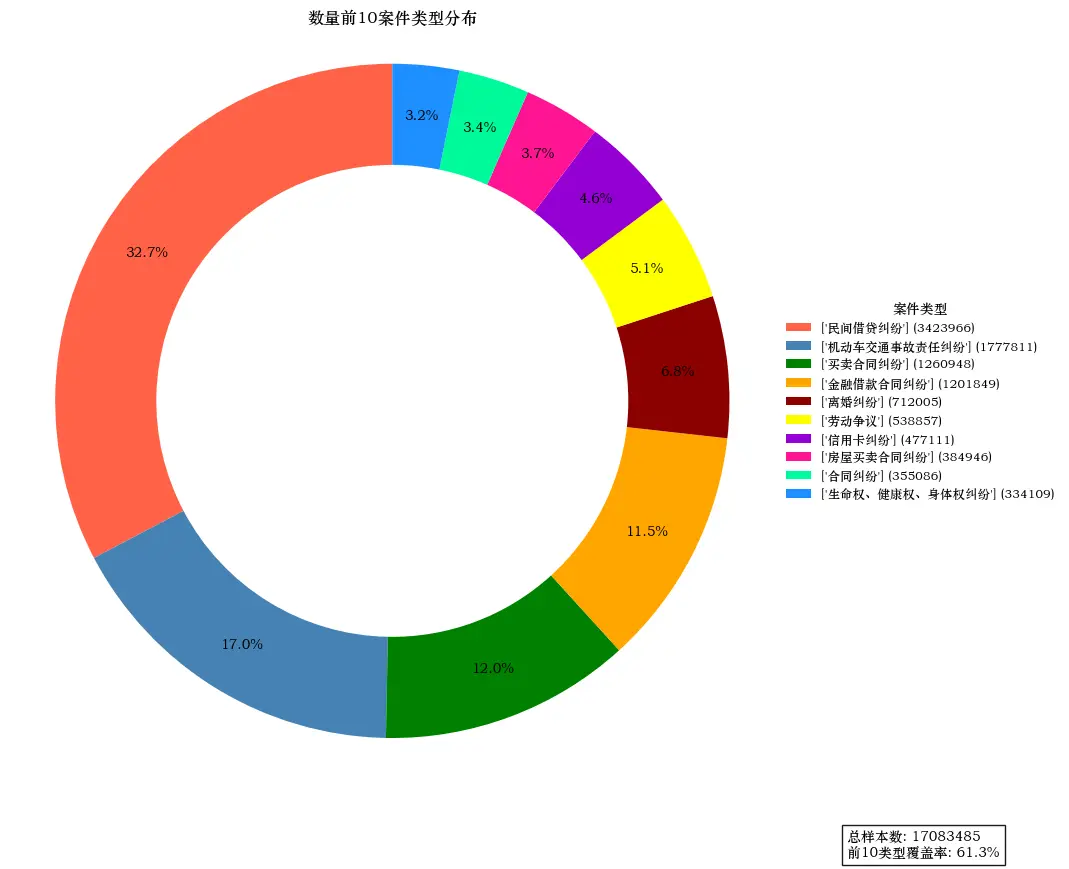
importpandasaspdimportmatplotlib.pyplotaspltfromaquarelimportload_theme# Load and apply the themetheme=load_theme("boxy_light")theme.apply()# Set the Chinese fontplt.rcParams['font.sans-serif']=['STZhongsong']plt.rcParams['axes.unicode_minus']=False# Data processingtypes=df['type'].explode().value_counts()top_types=types.head(10)# Color configurationcolors=['#FF6347','#4682B4','#008000','#FFA500','#8B0000','#FFFF00','#9400D3','#FF1493','#00FA9A','#1E90FF']# Create the canvasfig,ax=plt.subplots(figsize=(10,8))# Draw the donut chartwedges,texts,autotexts=ax.pie(top_types.values,autopct='%1.1f%%',startangle=90,pctdistance=0.85,wedgeprops=dict(width=0.3),colors=colors)# Create a custom legendlegend_labels=[f"{label} ({value})"forlabel,valueinzip(top_types.index,top_types.values)]legend=ax.legend(wedges,legend_labels,title="案件类型",loc="center left",bbox_to_anchor=(1,0,0.5,1),fontsize=9,title_fontsize=10,frameon=False)# Add statistical infototal=len(df['type'])plt.text(1.35,-1.35,f"总样本数: {total}\n前10类型覆盖率: {top_types.sum()/total:.1%}",bbox=dict(facecolor='white',alpha=0.9))# Adjust the layoutplt.title('数量前10案件类型分布',pad=20)plt.tight_layout()plt.axis('equal')plt.show()
As shown
Bar Chart
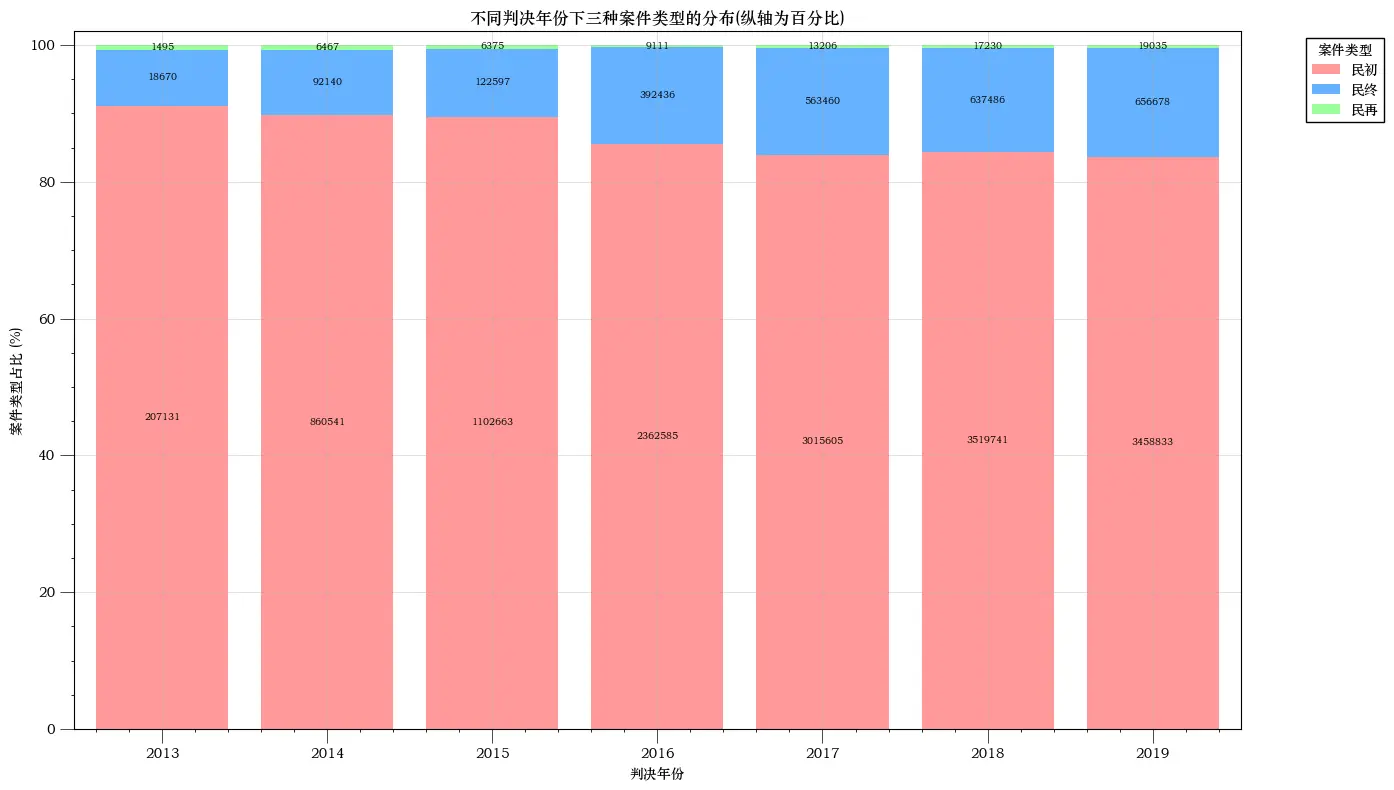
Optimized the number arrangement so it doesn’t overlap.
Specified the ordering of 民初, 再, and 终 case numbers.
Used the Python package pip install aquarel to optimize the plot style.
importpandasaspdimportmatplotlib.pyplotaspltfrompylabimportmpl# Set the Chinese font and fix the minus-sign displaympl.rcParams['font.sans-serif']=['STZhongsong']# Specify the default font: solve the problem of plot not displaying Chinesempl.rcParams['axes.unicode_minus']=False# Solve the problem of the minus sign '-' showing as a box when saving images# Load the datadf=pd.read_csv(r'C:\Users\PC\Desktop\hzp_project_re\re_论文开始\最终面板数据\民事上诉样本.csv',encoding='utf-8',low_memory=False)# Extract the case type from case_wid_strdf['case_type']=df['case_wid_str'].str.extract(r'(民初|民终|民再)')# Count the distribution of each case type across court levelsdistribution=df.groupby(['court','case_type']).size().unstack(fill_value=0)# Keep only specific court levels, but only those that actually existdesired_courts=[1,3,4,5,6]existing_courts=[courtforcourtindesired_courtsifcourtindistribution.index]distribution=distribution.loc[existing_courts]# Compute the total case count per court leveltotal_cases_per_court=distribution.sum(axis=1)# Compute the proportionsdistribution_ratio=distribution.div(total_cases_per_court,axis=0)*100# Set the figure sizeplt.figure(figsize=(12,8))# Define an empty list for the bottom heightsbottoms=[0]*len(distribution_ratio)# Stack in the order 民初, 民再, 民终case_types_order=['民初','民再','民终']forcase_typeincase_types_order:# Use ascending order to ensure 民初 is at the bottomifcase_typeindistribution.columns:plt.bar(range(len(distribution_ratio.index)),distribution_ratio[case_type],bottom=bottoms,label=case_type)# Display the specific count above each barforindex,valueinenumerate(distribution[case_type]):text_y_position=bottoms[index]+(distribution_ratio.loc[existing_courts[index],case_type]/2)# Adjust text positions to avoid overlapifcase_type=='民再':ifindex%2==0:text_y_position+=2# Move upelse:text_y_position-=2# Move downplt.text(index,text_y_position,str(int(value)),ha='center',va='center',color='black',fontsize=9)# Update the bottom heightsbottoms=[sum(x)forxinzip(bottoms,distribution_ratio[case_type])]# Modify the x-axis labelscourt_labels={i:labelfori,labelinenumerate(["最高","高级","中级","基层","专门"][:len(existing_courts)])}plt.xticks(range(len(existing_courts)),list(court_labels.values()))# Add the title and labelsplt.title('案件类型在不同法院级别的比例分布',fontsize=14,pad=20)plt.xlabel('法院级别',fontsize=12,labelpad=15)plt.ylabel('比例 (%)',fontsize=12,labelpad=15)plt.legend(title="案件类型",bbox_to_anchor=(1.05,1),loc='upper left')# Show the chartplt.tight_layout()plt.show()
As shown
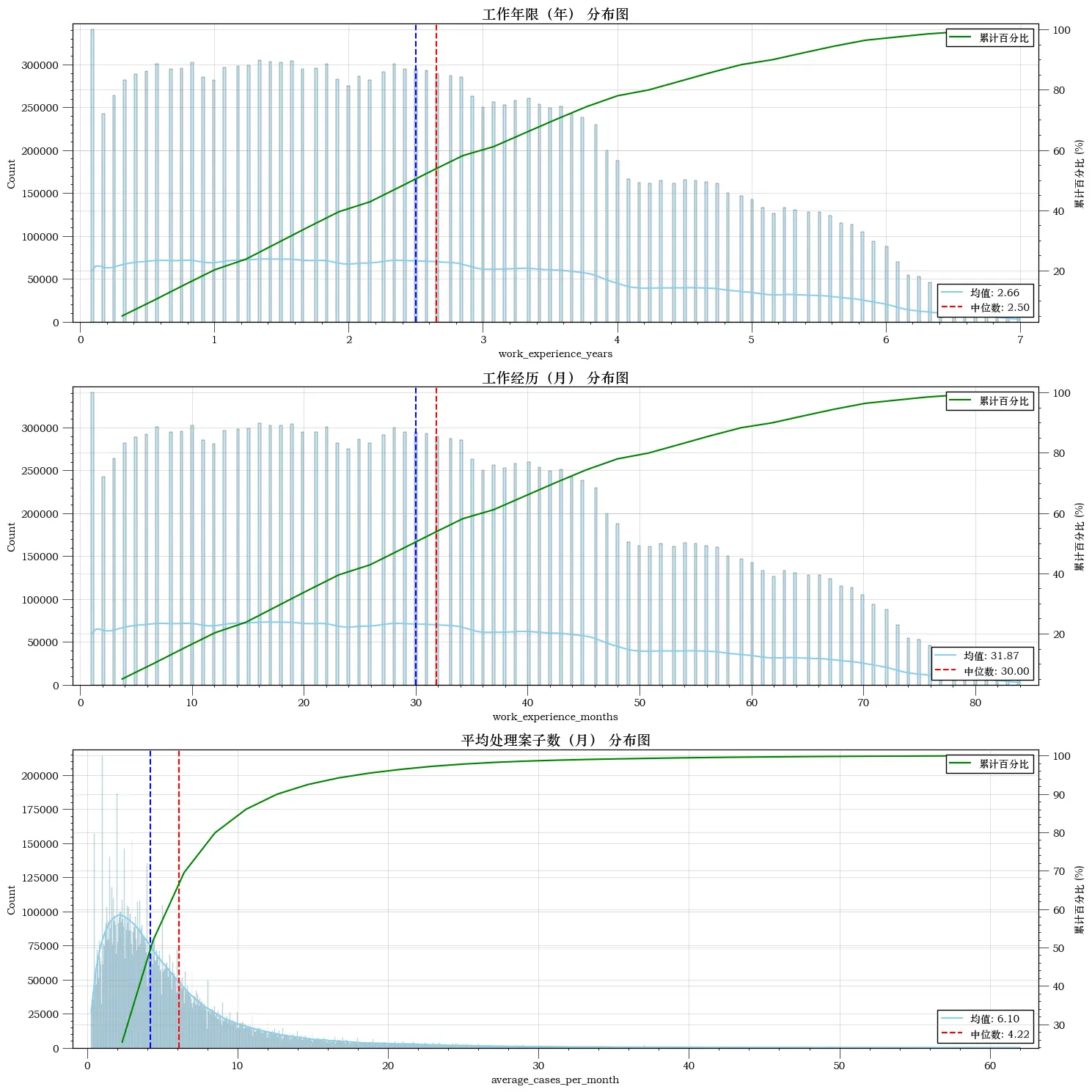
Mean and Median Distribution Plot
Includes the mean, median, and cumulative proportion.
importpandasaspdimportnumpyasnpimportmatplotlib.pyplotaspltimportseabornassnsfrompylabimportmpl# Set the Chinese font and fix the minus-sign displaympl.rcParams['font.sans-serif']=['STZhongsong']# Specify the default font: solve the problem of plot not displaying Chinesempl.rcParams['axes.unicode_minus']=False# Solve the problem of the minus sign '-' showing as a box when saving images# Assume this is the mapping from your data columns to their Chinese namesvar_names_zh={'work_experience_years':'工作年限(年)','work_experience_months':'工作经历(月)','average_cases_per_month':'平均处理案子数(月)'}# Load the datadf=pd.read_csv(r'C:\Users\PC\Desktop\hzp_project_re\re_论文开始\最终面板数据\民事上诉样本.csv',encoding='utf-8',low_memory=False)# Convert work experience to yearsdf['work_experience_years']=df['work_experience_months']/12# Compute how many cases are handled per month on averagedf['average_cases_per_month']=df['cumulative_count']/(df['work_experience_months']+1)defadd_statistics(ax,data):"""在给定的轴上添加平均数和中位数的标注"""mean_val=data.mean()median_val=data.median()ax.axvline(mean_val,color='red',linestyle='--')ax.axvline(median_val,color='blue',linestyle='--')# Add the legend to the lower rightax.legend([f'均值: {mean_val:.2f}',f'中位数: {median_val:.2f}'],loc='lower right')defadd_percentage_axis(ax,data):"""在给定的轴上添加右侧的百分比轴"""values,base=np.histogram(data.dropna(),bins=30)cumulative=np.cumsum(values)percentage=cumulative/cumulative[-1]*100# Convert the cumulative values to percentagesax_percent=ax.twinx()ax_percent.plot(base[1:],percentage,c='green',label='累计百分比')ax_percent.set_ylabel('累计百分比 (%)')ax_percent.legend(loc='upper right')deftrim_data(data,lower=0.5,upper=99.5):"""返回给定百分比范围内的数据"""lower_quantile=np.percentile(data,lower)upper_quantile=np.percentile(data,upper)returndata[(data>=lower_quantile)&(data<=upper_quantile)]variables=['work_experience_years','work_experience_months','average_cases_per_month']fig,axes=plt.subplots(len(variables),1,figsize=(15,len(variables)*5))foridx,varinenumerate(variables):# Use the Chinese namevar_zh=var_names_zh.get(var,var)ifvar=='average_cases_per_month':data_to_plot=trim_data(df[var])else:data_to_plot=df[var]# Raw data distributionsns.histplot(data_to_plot,kde=True,color="skyblue",edgecolor="black",ax=axes[idx])axes[idx].set_title(f'{var_zh} 分布图',fontsize=14)add_statistics(axes[idx],data_to_plot)# Add the mean and median annotations# Add the cumulative percentage axisadd_percentage_axis(axes[idx],data_to_plot)plt.tight_layout()plt.show()

 滑翔闪 included in Economic Studies and Stata Empirical Tools