
Sakana 小组件集成

Contents

LDA Topic Modeling and Gephi Visualization
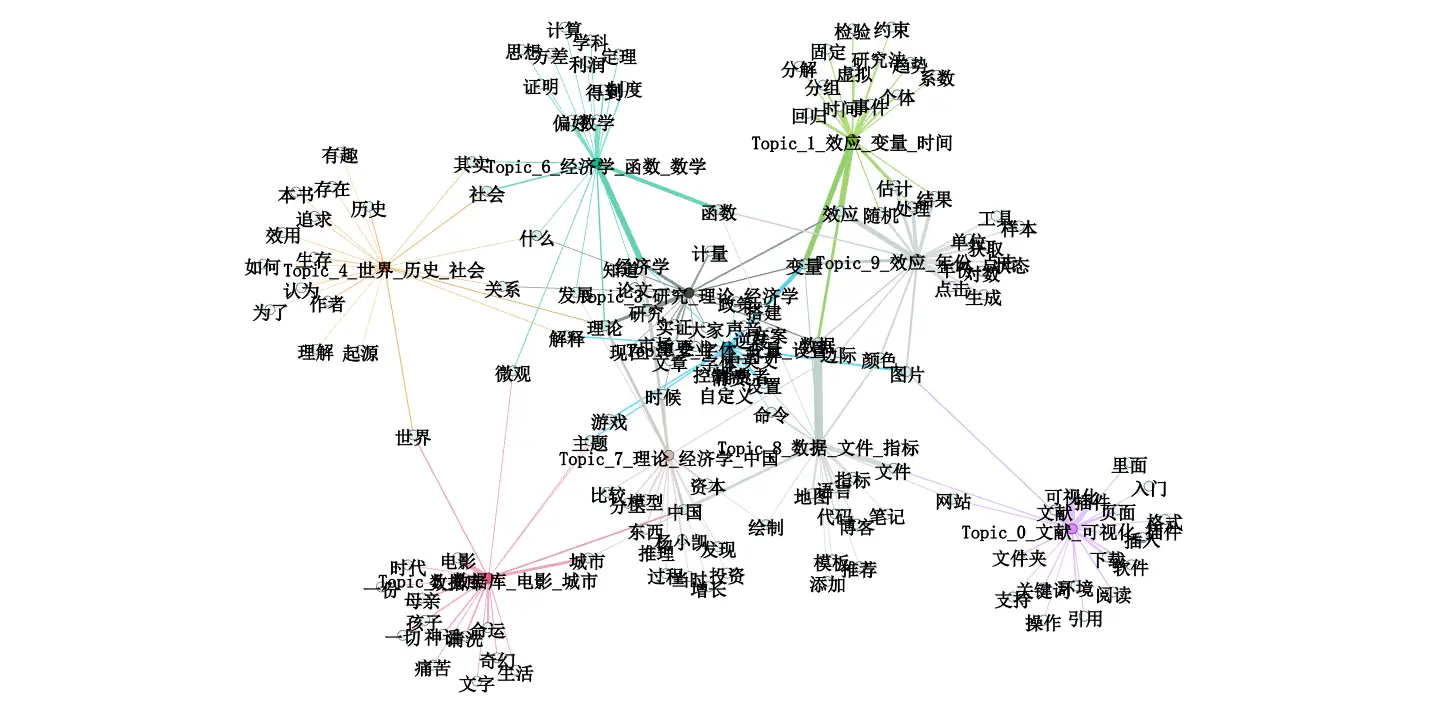
Recently, many economics papers have employed LDA topic modeling1 and social network analysis. Here, I attempt to visualize blog topic keywords using this methodology. The workflow is as follows:

  • Python reads markdown documents.
  • Cleans and tokenizes text.
  • Builds LDA topics.
  • Constructs network data.
  • Visualizes using Gephi.

LDA Topic Modeling

LDA is an established technique in computational text analysis, yet it remains simple and effective, serving as an unsupervised machine learning method. For economics, it suffices to understand that it summarizes the number of topic keywords in a text. In top-tier journal articles, it is often used to measure data types2.

Examples of applications in research papers:

For understanding LDA, I recommend a concise and intuitive YouTube video (requires VPN access):

Gephi

Examples

Gephi is a network relationship visualization software. I was first introduced to this software by my blogger friend SongSong. He used this software in his thesis to study the Global Lithium Product Trade Dependency Network.

For foundational knowledge of network analysis, I highly recommend the open-source Iris Flower statistics textbook “The Way of Data.”

The most classic example of social networks is Six Degrees of Separationthrough six key individuals, one can connect with anyone in the world. This theory manifests in network analysis as (shortest) paths and network connectivity.

The most classic dataset for social network analysis is the Karate Club. The karate club had two instructors who eventually parted ways. A statistician had previously recorded interpersonal relationships within the club, and after social network visualization and clustering, the resulting division closely matched the actual split.
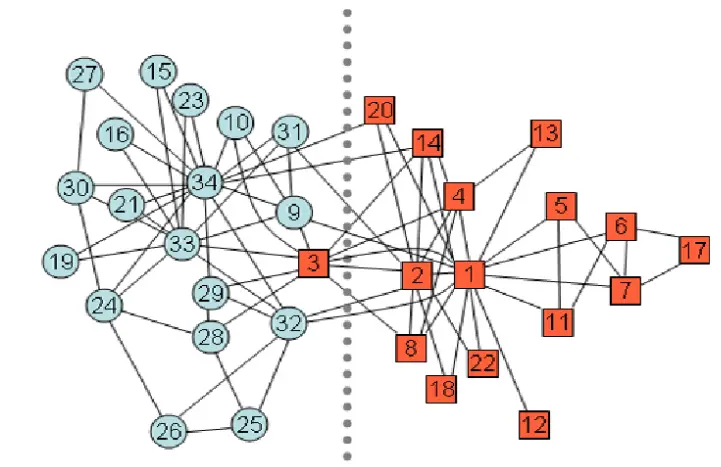
/img/社会网络.zh-cn-20250824235924254.webp
Karate Club dataset visualization, source: Wikipedia

Social network visualization primarily involves network evolution (clustering, fragmentation), distribution3 (key nodes, weights, density, structure4), and prediction.

The paper “Ownership Networks and Firm Growth: What Do Forty Million Companies Tell Us About the Chinese Economy?” studies the distribution and evolution of China’s equity networks.
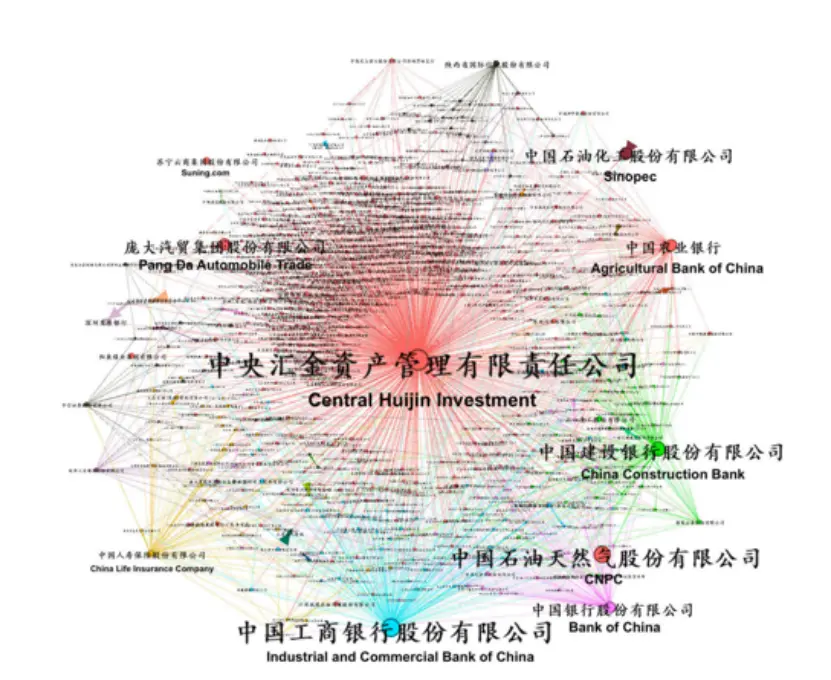
/img/社会网络.zh-cn-20250824230329625.webp
As shown

The paper “Community Interaction and Conflict on the Web” examines Reddit community networks: less than 1% of communities initiated 74% of negative mobilization behaviors. These conflicts are typically started by core members of active communities, while the actual participants are less active peripheral members.
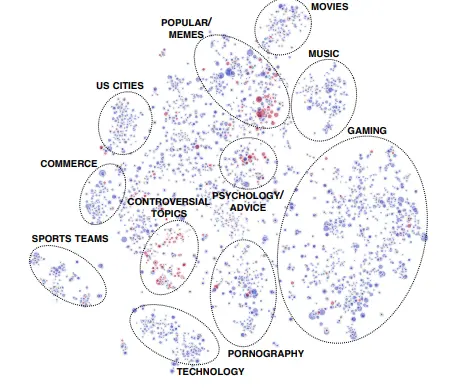
/img/社会网络.zh-cn-20250824231228354.webp
Reddit community network

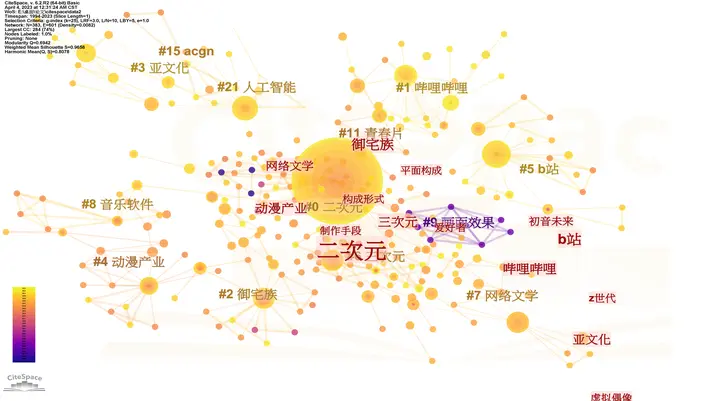
Literature review software like Citespace also constitutes a form of network analysis, specifically knowledge graphs. See another blog post “Citespace Literature Visualization.”

Previously tested images.
/img/Citespace文献可视化.zh-cn-20240523120837358.webp
Anime theme, revealing Bilibili and Hatsune Miku as third-level keywords (homo is like this)

Analysis Software

Summarized by GPT regarding available social network analysis software options.

Tool Positioning Advantages Disadvantages Suitable Scenarios
Gephi Network Visualization + Exploration User-friendly interface; rich layout algorithms; community detection features Visualization-focused; not suitable for ultra-large networks Rapid visualization, presentations, exploration
Cytoscape Originally for biological networks → General-purpose Rich plugin ecosystem; commonly used in research; tight integration of analysis and visualization Limited performance with large-scale data; slightly complex interface Bioinformatics, scientific network analysis
Pajek Classic social network analysis software Can handle million-scale networks; common in academia Outdated interface; steep learning curve Large-scale social network research
NodeXL Excel plugin (Microsoft ecosystem) Quick to learn; convenient for social media data scraping Limited features; full version requires commercial license Social media network analysis for beginners
Python NetworkX / igraph programming tools Flexible; customizable; can integrate with machine learning and text mining No visualization interface; requires coding Highly flexible, research experiments

Code

Three folders:

  1. Blog markdown folder (original blog .md files)
  2. Tokenization folder (txt documents with one word per line, e.g., 了, 的, 得, 地, 他, 她, 滑翔闪…)
  3. Results folder

I used jieba for tokenization and gensim.models for model training. For further optimization, modifications can be made at these stages5.

Note the version compatibility issues between gensim and numpy.

  1
  2
  3
  4
  5
  6
  7
  8
  9
 10
 11
 12
 13
 14
 15
 16
 17
 18
 19
 20
 21
 22
 23
 24
 25
 26
 27
 28
 29
 30
 31
 32
 33
 34
 35
 36
 37
 38
 39
 40
 41
 42
 43
 44
 45
 46
 47
 48
 49
 50
 51
 52
 53
 54
 55
 56
 57
 58
 59
 60
 61
 62
 63
 64
 65
 66
 67
 68
 69
 70
 71
 72
 73
 74
 75
 76
 77
 78
 79
 80
 81
 82
 83
 84
 85
 86
 87
 88
 89
 90
 91
 92
 93
 94
 95
 96
 97
 98
 99
100
101
102
103
104
105
106
107
108
109
110
111
112
113
114
115
116
117
118
119
120
121
122
123
124
125
126
127
128
129
130
131
132
133
134
135
136
137
138
139
140
141
142
143
144
145
146
147
148
149
150
151
152
153
154
155
156
157
158
159
160
161
162
163
164
165
166
167
168
169
170
171
172
173
174
175
176
177
178
179
180
181
182
183
184
185
186
187
188
189
190
191
192
193
194
195
196
197
198
199
200
201
202
203
204
205
206
207
208
209
210
211
212
213
214
215
216
217
218
219
220
221
222
223
224
225
226
227
228
229
230
231
232
233
234
235
236
237
238
239
240
241
242
243
244
245
246
247
248
249
250
251
252
253
254
255
256
257
258
259
260
261
262
263
264
265
266
267
268
269
270
271
272
273
274
275
276
277
278
279
280
281
282
283
import os
import re
import glob
import itertools
import jieba
import pandas as pd
import networkx as nx
from collections import defaultdict
from gensim import corpora
from gensim.models import LdaModel

# Global configuration parameters
DOCS_GLOB = r'D:\\PyTorch_practice\\博客分析\\数据\\原始博客\\*.md'   # Document path pattern
STOPWORDS_PATH = r'D:\\PyTorch_practice\\博客分析\\数据\\设置\\分词stop.txt'  # Optional stopwords file
OUTPUT_DIR = r'D:\\PyTorch_practice\\博客分析\\数据\\结果输出\\'       # Unified output folder
NO_BELOW = 5  # Words with frequency below this threshold will be filtered
NO_ABOVE = 0.5  # Words with frequency above this proportion will be filtered
KEEP_N = 100000  # Number of highest-frequency words to retain
NUM_TOPICS = 10  # Number of topics
TOPN = 20  # Number of keywords to display per topic
MAX_EDGES = 200  # Maximum number of edges to retain in word co-occurrence graph

# Default stopwords set
DEFAULT_STOPWORDS = set([
    '的', '了', '和', '是', '在', '就', '都', '而', '及', '与', '或', '一个', '我', '你', '他', '她', '它', '我们', '你们',
    '他们', '她们', '这', '那', '其', '又', '被', '上', '中', '对', '所', '为', '于'
])

def load_stopwords(path):
    """Load stopwords list"""
    sw = set()
    if os.path.exists(path):
        try:
            with open(path, 'r', encoding='utf-8', errors='ignore') as f:
                for line in f:
                    w = line.strip()
                    if w:
                        sw.add(w)
        except Exception as e:
            print(f'Failed to read stopwords file {path}: {e}')

    # If custom stopwords is empty, use default stopwords
    return sw if sw else DEFAULT_STOPWORDS

def load_documents(glob_pattern):
    """Load document collection"""
    docs = []
    filenames = []

    # Get matching file list
    file_list = sorted(glob.glob(glob_pattern))
    if not file_list:
        print(f'No matching files found: {glob_pattern}')
        return filenames, docs

    print(f'Found {len(file_list)} files')

    # Read each file content
    for fp in file_list:
        try:
            with open(fp, 'r', encoding='utf-8', errors='ignore') as f:
                text = f.read().strip()
                if text:
                    docs.append(text)
                    filenames.append(os.path.basename(fp))
        except Exception as e:
            print(f'Failed to read file {fp}: {e}')

    return filenames, docs

# Text cleaning and tokenization
RE_CLEAN = re.compile(r"[\s\d\u0000-\u007F]+")  # Remove ascii/digits/excessive whitespace, retain Chinese characters and punctuation

def preprocess(text, stopwords):
    """Text preprocessing: cleaning, tokenization, filtering"""
    text = RE_CLEAN.sub(' ', text)
    tokens = jieba.lcut(text)
    # Filter stopwords and single-character words
    tokens = [t for t in tokens if t.strip() and t not in stopwords and len(t) > 1]
    return tokens

def build_cooccurrence(tokens_list):
    """Build word co-occurrence matrix"""
    cooc = defaultdict(int)
    freq = defaultdict(int)

    for tokens in tokens_list:
        # Deduplicate words within each document
        unique_tokens = list(dict.fromkeys(tokens))

        # Update word frequency
        for w in unique_tokens:
            freq[w] += 1

        # Build co-occurrence relationships
        for a, b in itertools.combinations(unique_tokens, 2):
            if a != b:
                # Ensure ordering to avoid duplicate counting
                key = (a, b) if a < b else (b, a)
                cooc[key] += 1

    return freq, cooc

def main():
    """Main function"""
    # Create output directory
    os.makedirs(OUTPUT_DIR, exist_ok=True)

    print('Loading stopwords...')
    stopwords = load_stopwords(STOPWORDS_PATH)
    print(f'Loaded {len(stopwords)} stopwords')

    print('Loading documents...')
    filenames, docs = load_documents(DOCS_GLOB)
    print(f'Found {len(docs)} documents')

    if len(docs) == 0:
        print('No documents found, check DOCS_GLOB setting')
        return

    print('Tokenizing and preprocessing... (this may take some time)')
    texts = [preprocess(d, stopwords) for d in docs]

    # Statistics for processed vocabulary
    total_tokens = sum(len(text) for text in texts)
    print(f'Preprocessing complete, processed {total_tokens} tokens')

    # Build dictionary and corpus
    print('Building dictionary and corpus...')
    dictionary = corpora.Dictionary(texts)
    original_size = len(dictionary)
    dictionary.filter_extremes(no_below=NO_BELOW, no_above=NO_ABOVE, keep_n=KEEP_N)
    filtered_size = len(dictionary)
    print(f'Dictionary filtering: {original_size} -> {filtered_size} words')

    corpus = [dictionary.doc2bow(text) for text in texts]

    # Train LDA model
    print('Training LDA model...')
    lda = LdaModel(
        corpus=corpus,
        id2word=dictionary,
        num_topics=NUM_TOPICS,
        passes=15,
        random_state=42,
        per_word_topics=True
    )

    # Save model
    model_path = os.path.join(OUTPUT_DIR, 'lda_model.model')
    lda.save(model_path)
    print(f'LDA model saved: {model_path}')

    # Output topic-word distribution
    topics = lda.show_topics(num_topics=NUM_TOPICS, num_words=TOPN, formatted=False)
    print('\nTopic keywords (one topic per line):')

    rows_kw = []
    for tid, terms in topics:
        topic_words = ', '.join([f'{w}({p:.4f})' for w, p in terms])
        print(f'Topic {tid}: {topic_words}')

        for rank, (word, prob) in enumerate(terms, start=1):
            rows_kw.append({
                'topic': tid,
                'rank': rank,
                'word': word,
                'weight': float(prob)
            })

    # Save topic keywords
    kw_path = os.path.join(OUTPUT_DIR, 'topic_keywords.csv')
    df_kw = pd.DataFrame(rows_kw)
    df_kw.to_csv(kw_path, index=False, encoding='utf-8-sig')
    print(f'Topic keywords saved: {kw_path}')

    # Export document-topic distribution
    print('Exporting document-topic distribution...')
    rows = []
    for doc_id, bow in enumerate(corpus):
        doc_topics = lda.get_document_topics(bow, minimum_probability=0.0)
        for tid, weight in doc_topics:
            rows.append({
                'doc': filenames[doc_id],
                'doc_id': doc_id,
                'topic': int(tid),
                'weight': float(weight)
            })

    dt_path = os.path.join(OUTPUT_DIR, 'doc_topic.csv')
    df_dt = pd.DataFrame(rows)
    df_dt.to_csv(dt_path, index=False, encoding='utf-8-sig')
    print(f'Document-topic distribution saved: {dt_path}')

    # Build topic-term bipartite graph
    print('Building topic-term bipartite graph...')
    G = nx.Graph()

    for tid, terms in topics:
        # Use top 3 keywords as topic name
        top_words = [w for w, _ in terms[:3]]
        topic_label = f"Topic_{tid}_" + "_".join(top_words)
        G.add_node(f'topic_{tid}', label=topic_label, type='topic', topic_id=tid)

    for tid, terms in topics:
        for term, prob in terms:
            if not G.has_node(term):
                G.add_node(term, label=term, type='term')
            weight = float(prob)
            G.add_edge(f'topic_{tid}', term, weight=weight)

    # Save bipartite graph
    bipartite_path = os.path.join(OUTPUT_DIR, 'gephi_topic_term.gexf')
    nx.write_gexf(G, bipartite_path)
    print(f'Topic-Term bipartite graph saved: {bipartite_path}')

    # Build word co-occurrence graph
    print('Building word co-occurrence graph...')
    freq, cooc = build_cooccurrence(texts)

    # Sort edges by weight, keep only top MAX_EDGES edges
    sorted_edges = sorted(cooc.items(), key=lambda x: x[1], reverse=True)

    # Collect all nodes to keep (nodes appearing in top MAX_EDGES edges)
    nodes_to_keep = set()
    edges_to_keep = []

    for (a, b), w in sorted_edges:
        if len(edges_to_keep) >= MAX_EDGES:
            break
        nodes_to_keep.add(a)
        nodes_to_keep.add(b)
        edges_to_keep.append(((a, b), w))

    # Create graph, add only nodes and edges to keep
    H = nx.Graph()

    # Add nodes (only those appearing in edges)
    for node in nodes_to_keep:
        if node in freq:
            H.add_node(node, label=node, frequency=int(freq[node]), type='term')

    # Add edges
    for (a, b), w in edges_to_keep:
        if a in H and b in H:  # Ensure both nodes exist
            H.add_edge(a, b, weight=int(w))

    # Remove isolated nodes (if any)
    H.remove_nodes_from(list(nx.isolates(H)))

    print(f'Word co-occurrence graph contains {H.number_of_nodes()} nodes and {H.number_of_edges()} edges')

    # Save co-occurrence graph
    cooccurrence_path = os.path.join(OUTPUT_DIR, 'gephi_term_cooccurrence.gexf')
    nx.write_gexf(H, cooccurrence_path)
    print(f'Word co-occurrence graph saved: {cooccurrence_path}')

    # Output summary information
    print('\nAll tasks completed. Generated files:')
    output_files = [
        'lda_model.model',
        'topic_keywords.csv',
        'doc_topic.csv',
        'gephi_topic_term.gexf',
        'gephi_term_cooccurrence.gexf'
    ]

    for fn in output_files:
        file_path = os.path.join(OUTPUT_DIR, fn)
        if os.path.exists(file_path):
            file_size = os.path.getsize(file_path)
            print(f' - {file_path} ({file_size/1024:.1f} KB)')
        else:
            print(f' - {file_path} (file not generated)')

    print('\nGephi visualization suggestions:')
    print('1. Open Gephi: File → Open → Select .gexf file')
    print('2. Use Layout (e.g., ForceAtlas2) for arrangement')
    print('3. Color/filter based on node attribute "type"')
    print('4. Adjust node size based on degree/weight')

if __name__ == '__main__':
    main()

After using the code to generate the graph file gephi_topic_term.gexf,

  1. Open Gephi: File → Open → Select .gexf file
  2. Use Layout (e.g., ForceAtlas2) for arrangement
  3. Color/filter based on node attribute “type”
  4. Adjust node size based on degree/weight

If you’ve used Citespace, you’ll find Gephi’s beautification operations familiar6. Personally, I feel this type of visualization primarily serves to intuitively present clustering structures, but in practice, large datasets struggle with force-directed graph visualization. The focus of social network analysis lies in capturing and measuring special structures and important nodes.

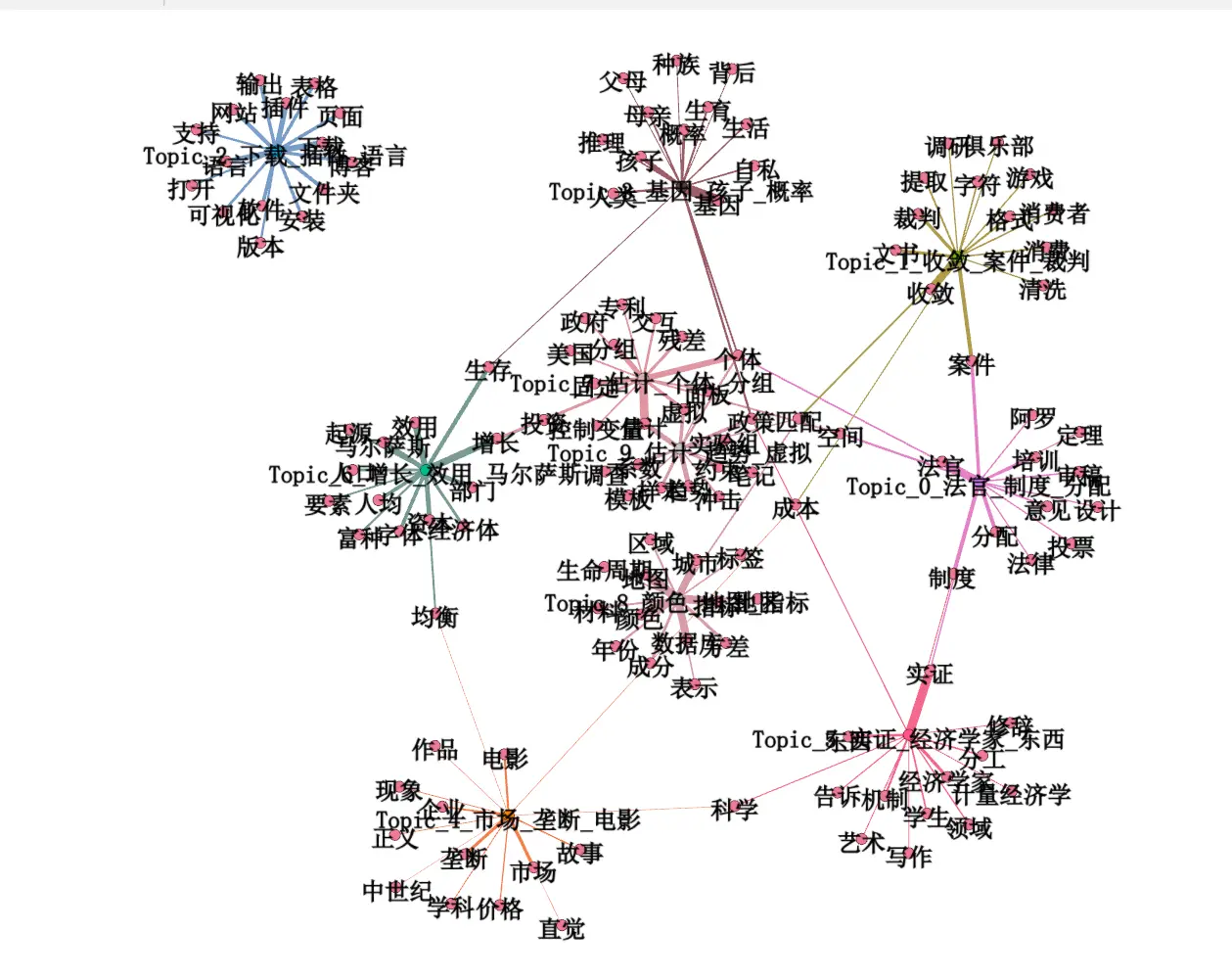
After using LDA to generate topics and words, the visualization results are as follows:

It appears my blog revolves around economics, branching out to software and sub-disciplines. Movie reviews and other software topics are indeed isolated at the farthest edges.

/img/社会网络.zh-cn-20250824180041018.webp
LDA generated topics|444x221

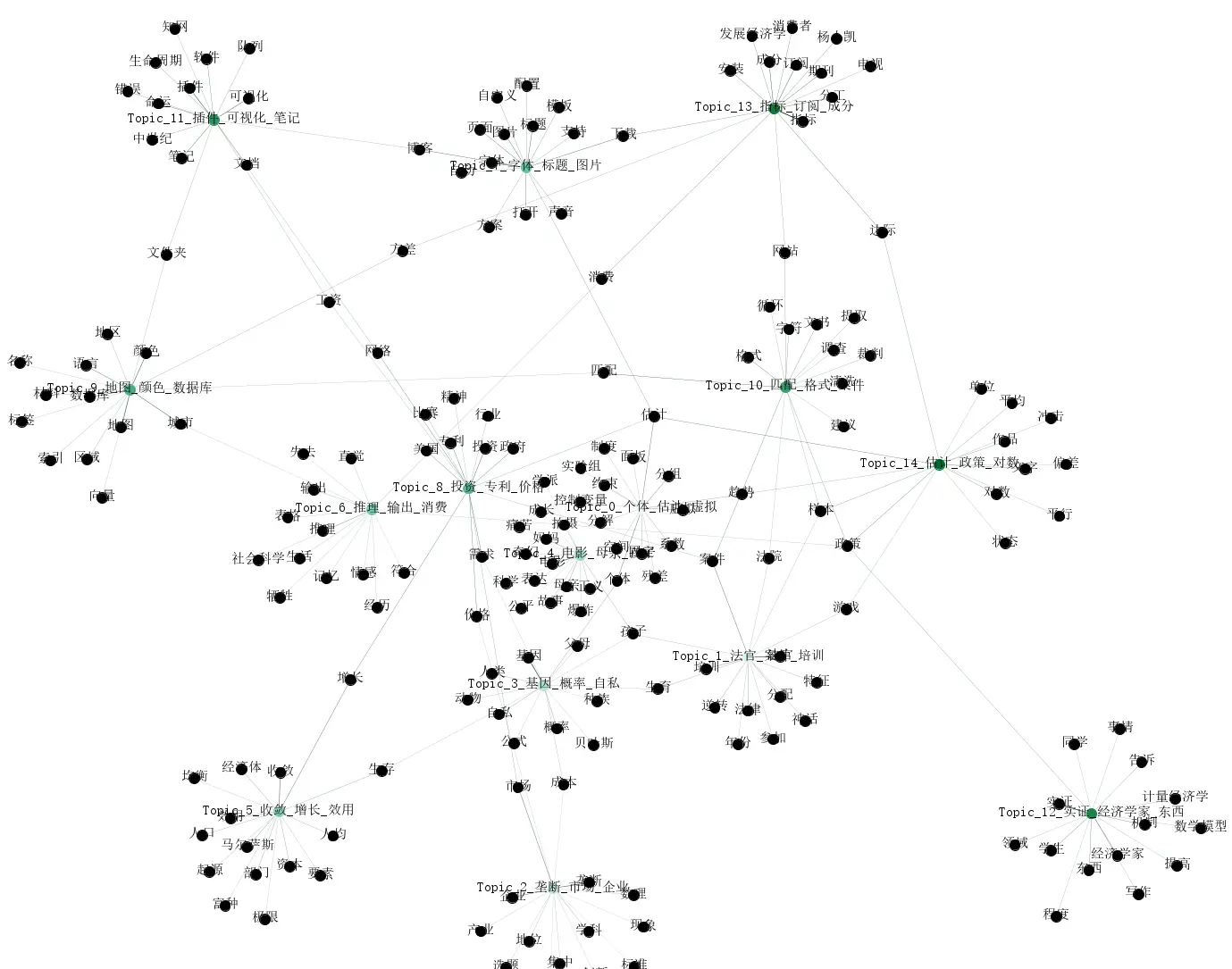
The following image results from optimized code using jieba to further remove adverbs and adjectives. Personally, I feel this type of image summary is quite effective.
/img/社会网络.zh-cn-1759046125538.webp
As shown
/img/社会网络.zh-cn-1759046196231.webp
15 topics

Optimized code (my personal laptop couldn’t handle it, so I bought a cheap cloud server to run it).

  1
  2
  3
  4
  5
  6
  7
  8
  9
 10
 11
 12
 13
 14
 15
 16
 17
 18
 19
 20
 21
 22
 23
 24
 25
 26
 27
 28
 29
 30
 31
 32
 33
 34
 35
 36
 37
 38
 39
 40
 41
 42
 43
 44
 45
 46
 47
 48
 49
 50
 51
 52
 53
 54
 55
 56
 57
 58
 59
 60
 61
 62
 63
 64
 65
 66
 67
 68
 69
 70
 71
 72
 73
 74
 75
 76
 77
 78
 79
 80
 81
 82
 83
 84
 85
 86
 87
 88
 89
 90
 91
 92
 93
 94
 95
 96
 97
 98
 99
100
101
102
103
104
105
106
107
108
109
110
111
112
113
114
115
116
117
118
119
120
121
122
123
124
125
126
127
128
129
130
131
132
133
134
135
136
137
138
139
140
141
142
143
144
145
146
147
148
149
150
151
152
153
154
155
156
157
158
159
160
161
162
163
164
165
166
167
168
169
170
171
172
173
174
175
176
177
178
179
180
181
182
183
184
185
186
187
188
189
190
191
192
193
194
195
196
197
198
199
200
201
202
203
204
205
206
207
208
209
210
211
212
213
214
215
216
217
218
219
220
221
222
223
224
225
226
227
228
229
230
231
232
233
234
235
236
237
238
239
240
241
# -*- coding: utf-8 -*-
"""
Optimized LDA pipeline: Supports Markdown (.md) documents, automatic stopwords, part-of-speech filtering
- Uses LdaMulticore for multi-threaded training
- Supports whitelist words to force retention as topic keywords
- Directly generates Gephi bipartite graphs
"""

import os
import glob
import re
import jieba
import jieba.posseg as pseg
import pandas as pd
import networkx as nx
from collections import defaultdict
from gensim import corpora
from gensim.models.ldamulticore import LdaMulticore

# Markdown parsing
try:
    import markdown
    from bs4 import BeautifulSoup
except ImportError:
    print("Error: Missing required libraries, please execute 'pip install markdown beautifulsoup4'")
    exit()

# -------------------- Configuration --------------------
DOCS_GLOB = "/root/博客分析/数据/原始博客/*.md"
STOPWORDS_PATH = "/root/博客分析/数据/设置/分词stop.txt"
OUTPUT_DIR = "/root/博客分析/数据/结果输出"

# Dictionary and corpus parameters
NO_BELOW = 3            # Minimum document frequency for words
NO_ABOVE = 0.8          # Maximum document frequency proportion for words
KEEP_N = 100000              # Maximum dictionary size

# LDA model parameters
NUM_TOPICS = 10         # Number of topics
TOPN = 15               # Number of keywords per topic
PASSES = 20             # LDA training passes
WORKERS = 28             # Number of threads (recommended = CPU cores - 1)
CHUNKSIZE = 5000        # Documents per batch
BATCH = True            # Whether to use mini-batch training

# Tokenization and stopwords
USE_POS_FILTER = True
POS_BLACKLIST = set(['x', 'c', 'u', 'd', 'p', 't', 'm', 'q', 'r'])
USE_AUTO_DF_STOPWORDS = True
AUTO_DF_THRESHOLD = 0.8
AUTO_DF_TOPK = 200

# Additional stopwords
ADDITIONAL_STOPWORDS = set([
    '什么', '推荐', '获取', '点击', '生成', '绘制',
    '存在', '问题', '使用', '可以', '我们', '现在', '通过', '文章', '内容', '研究法', '人为', '保留', '来讲', '叫魂', '学家'
])

DEFAULT_STOPWORDS = set([
    '的', '了', '和', '是', '在', '就', '都', '而', '及', '与', '或', '一个',
    '我', '你', '他', '她', '它', '我们', '你们', '他们', '她们', '这', '那', '其', '又', '被', '上', '中', '对', '所', '为', '于'
])

# Whitelist words (force retention as topic keywords)
WHITELIST_WORDS = set(['经济', '国家', '政府', '政策', '文学'])

# Text cleaning regex
RE_CLEAN = re.compile(r"[\s\d\u0000-\u007F]+")


# -------------------- Functions --------------------
def extract_text_from_markdown(md_content):
    html = markdown.markdown(md_content)
    soup = BeautifulSoup(html, 'html.parser')
    for tag in soup(['pre', 'code']):
        tag.decompose()
    return soup.get_text(separator=' ')


def load_stopwords(path):
    sw = set()
    if os.path.exists(path):
        with open(path, 'r', encoding='utf-8', errors='ignore') as f:
            for line in f:
                w = line.strip()
                if w:
                    sw.add(w)
    combined = set(DEFAULT_STOPWORDS) | set(ADDITIONAL_STOPWORDS) | sw
    return combined


def load_documents(glob_pattern):
    docs, filenames = [], []
    file_list = sorted(glob.glob(glob_pattern, recursive=True))
    if not file_list:
        print(f'No files found: {glob_pattern}')
        return filenames, docs
    print(f'Found {len(file_list)} files')
    for fp in file_list:
        try:
            with open(fp, 'r', encoding='utf-8', errors='ignore') as f:
                raw_text = f.read().strip()
                if raw_text:
                    clean_text = extract_text_from_markdown(raw_text)
                    docs.append(clean_text)
                    filenames.append(os.path.basename(fp))
        except Exception as e:
            print(f'Failed to read {fp}: {e}')
    return filenames, docs


def auto_find_generic_terms(tokens_list, threshold=AUTO_DF_THRESHOLD, top_k=AUTO_DF_TOPK):
    n_docs = len(tokens_list)
    if n_docs == 0:
        return set()
    df = defaultdict(int)
    for tokens in tokens_list:
        for t in set(tokens):
            df[t] += 1
    df_ratio = {t: cnt / n_docs for t, cnt in df.items()}
    high_df = {t for t, r in df_ratio.items() if r >= threshold}
    if len(high_df) < top_k:
        sorted_by_df = sorted(df.items(), key=lambda x: x[1], reverse=True)
        high_df |= {t for t, _ in sorted_by_df[:top_k]}
    return high_df


def preprocess(text, stopwords, use_pos_filter=USE_POS_FILTER, pos_blacklist=POS_BLACKLIST):
    if not isinstance(text, str):
        return []
    text = RE_CLEAN.sub(' ', text)
    if use_pos_filter:
        words = []
        for w, flag in pseg.cut(text):
            short_flag = flag.split()[0] if flag else flag
            if (short_flag in pos_blacklist or w in stopwords or len(w) <= 1) and w not in WHITELIST_WORDS:
                continue
            words.append(w)
        return words
    else:
        tokens = [t for t in jieba.lcut(text) if (t not in stopwords or t in WHITELIST_WORDS) and len(t) > 1]
        return tokens


# -------------------- Main workflow --------------------
def main():
    os.makedirs(OUTPUT_DIR, exist_ok=True)

    print('Loading stopwords...')
    stopwords = load_stopwords(STOPWORDS_PATH)
    print(f'Loaded {len(stopwords)} stopwords')

    print('Loading Markdown documents...')
    filenames, docs = load_documents(DOCS_GLOB)
    print(f'Successfully processed {len(docs)} documents')
    if len(docs) == 0:
        return

    print('Text preprocessing...')
    texts = [preprocess(d, stopwords) for d in docs]

    if USE_AUTO_DF_STOPWORDS:
        print('Automatically detecting high-frequency generic terms...')
        detected = auto_find_generic_terms(texts)
        detected -= WHITELIST_WORDS  # Whitelist words not added to stopwords
        if detected:
            print(f'Detected {len(detected)} generic terms, adding to stopwords and reprocessing')
            stopwords |= detected
            texts = [preprocess(d, stopwords) for d in docs]

    total_tokens = sum(len(text) for text in texts)
    print(f'Total {total_tokens} valid tokens')

    print('Building dictionary and corpus...')
    dictionary = corpora.Dictionary(texts)
    dictionary.filter_extremes(no_below=NO_BELOW, no_above=NO_ABOVE, keep_n=KEEP_N)
    corpus = [dictionary.doc2bow(text) for text in texts]

    print(f'Document count: {len(corpus)}, Dictionary size: {len(dictionary)}')
    print('Training LDA model (multi-threaded)...')
    lda = LdaMulticore(
        corpus=corpus,
        id2word=dictionary,
        num_topics=NUM_TOPICS,
        passes=PASSES,
        workers=WORKERS,
        chunksize=CHUNKSIZE,
        batch=BATCH,
        random_state=42,
        per_word_topics=True
    )
    model_path = os.path.join(OUTPUT_DIR, 'lda_model.model')
    lda.save(model_path)
    print(f'LDA model saved: {model_path}')

    # Topic keywords
    topics = lda.show_topics(num_topics=NUM_TOPICS, num_words=TOPN, formatted=False)
    rows_kw = []
    print('\nTopic keywords:')
    for tid, terms in topics:
        topic_words = ', '.join([f'{w}({p:.4f})' for w, p in terms])
        print(f'Topic {tid}: {topic_words}')
        for rank, (word, prob) in enumerate(terms, start=1):
            rows_kw.append({'topic': tid, 'rank': rank, 'word': word, 'weight': float(prob)})
    pd.DataFrame(rows_kw).to_csv(os.path.join(OUTPUT_DIR, 'topic_keywords.csv'),
                                 index=False, encoding='utf-8-sig')

    # Document-topic distribution
    rows_dt = []
    for doc_id, bow in enumerate(corpus):
        doc_topics = lda.get_document_topics(bow, minimum_probability=0.0)
        for tid, weight in doc_topics:
            rows_dt.append({'doc': filenames[doc_id], 'doc_id': doc_id, 'topic': int(tid), 'weight': float(weight)})
    pd.DataFrame(rows_dt).to_csv(os.path.join(OUTPUT_DIR, 'doc_topic.csv'),
                                 index=False, encoding='utf-8-sig')
    print('Document-topic distribution saved')

    # Build Topic-Term bipartite graph
    print('Building Topic-Term bipartite graph...')
    G = nx.Graph()
    for tid, terms in topics:
        top_words = [w for w, _ in terms[:3]]
        topic_label = f"Topic_{tid}_" + "_".join(top_words)
        G.add_node(f'topic_{tid}', label=topic_label, type='topic', topic_id=tid)
        for term, prob in terms:
            if not G.has_node(term):
                G.add_node(term, label=term, type='term')
            G.add_edge(f'topic_{tid}', term, weight=float(prob))
    nx.write_gexf(G, os.path.join(OUTPUT_DIR, 'gephi_topic_term.gexf'))
    print('Topic-Term bipartite graph saved')

    # Output file information
    print('\nAll tasks completed! Generated files:')
    for fn in ['lda_model.model', 'topic_keywords.csv', 'doc_topic.csv', 'gephi_topic_term.gexf']:
        path = os.path.join(OUTPUT_DIR, fn)
        if os.path.exists(path):
            print(f' - {path} ({os.path.getsize(path)/1024:.1f} KB)')


if __name__ == '__main__':
    main()

Some Reflections

I often criticize machine learning as a black box, but for someone like me who uses various analysis software, how different are many software methods from black boxes? If a Stata external command has an error, without deep understanding or theoretical cross-validation from multiple perspectives, it’s difficult to detect the mistake.

For example, “Stata” bdiff+reghdfe correct usage, many papers have been misled. I recall a previous did external command also had errors.

I believe AI will enhance positive feedback in code-based learning, but simultaneously, AI also brings the illusion of “I understand.” As Feynman consistently emphasized—knowing and understanding are not the same7. Running code and understanding code are far from the same level of learning. In the era of AI learning knowledge illusions, what truly constitutes understanding? Perhaps this needs to be reconsidered.


  1. Although LDA is an old method, economics excels at repurposing established techniques. ↩︎

  2. In recent years, the exploration of heterogeneous agents has become increasingly important ↩︎

  3. Descriptive statistics alone can be sufficiently eye-catching. ↩︎

  4. Viewing the universe as a network space, recent research suggests Earth may reside within a cosmic void. After reading a Zhihu answer about interstellar travel (Can humans truly never leave the Laniakea Supercluster?), I no longer believe in extraterrestrials on Earth 😢. ↩︎

  5. With AI, data analysis isn’t difficult; the challenge lies in obtaining suitable materials. ↩︎

  6. However, with large datasets, beautification calculations for dispersed distributions become too complex and are rarely used. ↩︎

  7. Hence Feynman’s criticism that social sciences might be pseudoscience. ↩︎