
Stata and AI Agents: A Powerful Pair for Empirical Work

When AI defeated Ke Jie, people still felt AI was far removed from their own work, much as a younger Ke Jie had once watched AI beat Lee Sedol with a certain youthful nonchalance. Only by 2026 did people learning empirical research start to feel a very specific kind of fear around “automation.”
Recently, Professor David Yanagizawa-Drott launched an agent-based empirical analysis project (APEP project); Terence Tao started a project on agent contributions to the Erdős problem list (AI contributions to Erdős problems). New buzzwords keep spilling out of computer science too: agent, skill, vibe coding, MCP, ABM model…1
For concrete research, take two examples2:
- A dataset on the spatiotemporal distributions of street and neighborhood crime in China: uses LLMs to extract variables from criminal case judgments.
- Decoding China’s Industrial Policies: uses LLMs to code and parse a massive body of policy documents.
A loose summary would be this: if you turn AI into an agent with some specific traits, let it operate software on your computer through MCP, and combine that with AI APIs and VSCode plugins, you get a kind of automated programming workflow - the thing people now like to call vibe coding. Here we can build a rough setup and get a feel for it.
Letting AI control software
The simplest integrated versions are Cursor and Claude Code3.
But you can also build an all-in-one setup inside VSCode.
You’ll need the following software:
- VSCode: the coding environment
- Git: version control and file-transfer management
- Node.js: for backend work, file operations, and hardware control
- cc Switch: for routing integrated AI API calls
If you’re setting this up in mainland China, the following video is a useful reference:
Once everything is in place, you can call an AI API directly inside VSCode and let it operate on the editor.
If this is your first time using VSCode, remember to create a new folder first. Then open VSCode, click File, and open that new folder. After that, you can do the rest of the work inside it.
Taking it further with Stata plugins
The StataMCP plugin
Once you finish the previous step, you can absolutely let the AI service help you with the rest of the setup 😀.
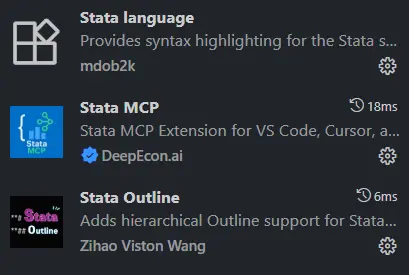
These are the Stata extensions I personally recommend installing in VSCode.
- Stata language: recognizes Stata syntax
- Stata Outline: lets the editor recognize document structure. The heading format is
**#. The number of#marks the heading level, up to six levels. - Stata MCP: the core extension that gives VSCode the ability to control Stata.
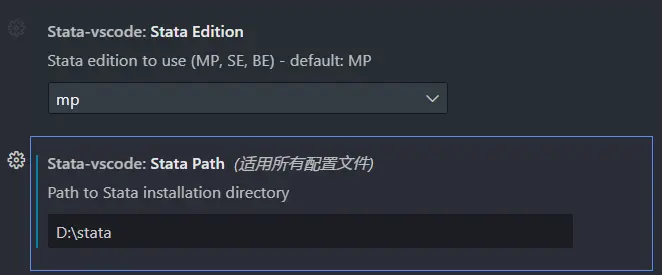
The extra setup is simple too. In the Stata MCP settings page, just enter the folder where your Stata installation lives.
For example, mine is D:\stata. I use the Stata MP version4.
The Stata MCP extension will add the following buttons to the interface. They more or less correspond to running Stata.

Giving AI permission to call Stata
To let AI actually control the Stata application, the first thing you need is the MCP bridge mcp-proxy.
ai <-> mcp-proxy <-> stata-mcp <-> StataYou can install it by running the following command directly in a powershell window.
pip install mcp-proxyConnecting Claude Code to StataMCP
claude code is fairly cautious about MCP management, and the integration is not as convenient as Codex. At the moment, I seem to have made it work by adding the following .json file under .claude.
{

  "mcpServers": {

    "stata-mcp": {

      "command": "mcp-proxy",

      "args": ["http://localhost:4000/mcp"]

    }

  }

}
Connecting Codex to StataMCP
This setup requires a licensed copy of Stata. If you’re using a cracked version, it needs to be one built around a license.
Next, in the AI tool’s local settings, let the AI know that the permission chain for calling Stata is already in place. Right now I’m using the vscode+codex combination, and the local config file is C:\Users\Administrator\.codex\config.toml.
At this step, you can simply let the AI edit the file for you.
Add the following settings.
[mcp_servers.stata-mcp]
command = "mcp-proxy"
args = ["http://localhost:4000/mcp"]
At that point, the AI finally has the ability to run code on its own.
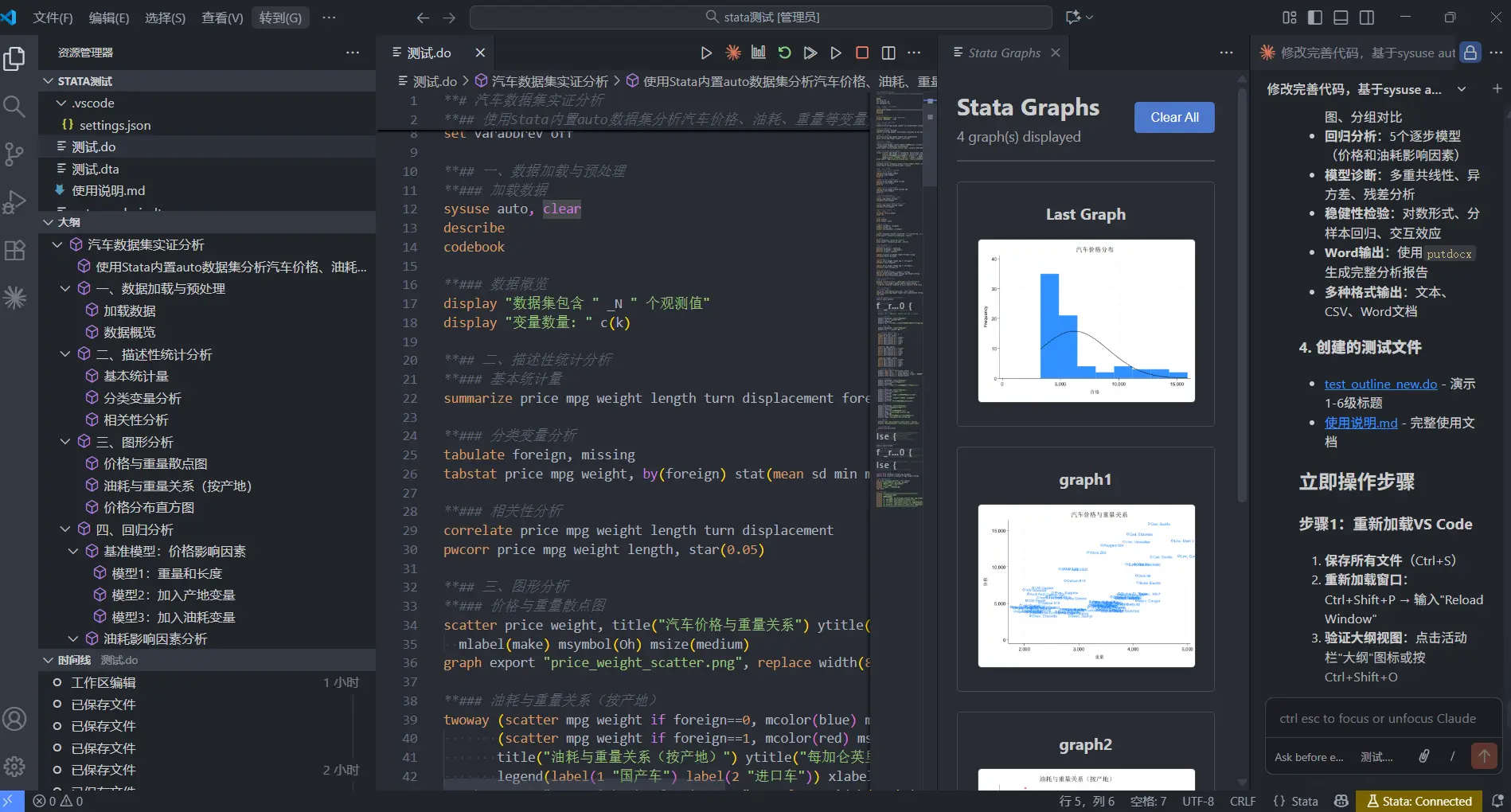
Prompt: revise and improve the code, using sysuse auto to carry out an empirical analysis. Add outline hierarchy to the code. Use
** #as the heading format. The number of#marks the heading level, up to six levels.
Other StataMCP plugins
Professor Thomas Monk at LSE also released his own StataMCP-style plugin, Stata Workbench. Personally, though, I don’t think it’s as handy as the StataMCP extension.
As for choosing a local CLI editor, if you’re not limited to VSCode, I personally recommend Claude Code. It is easier to switch models there, and it seems better suited to cross-platform use. If you only work inside VSCode, I would recommend Codex. At the moment, its engineering-side optimization really does feel better than Claude Code.
Paper tests
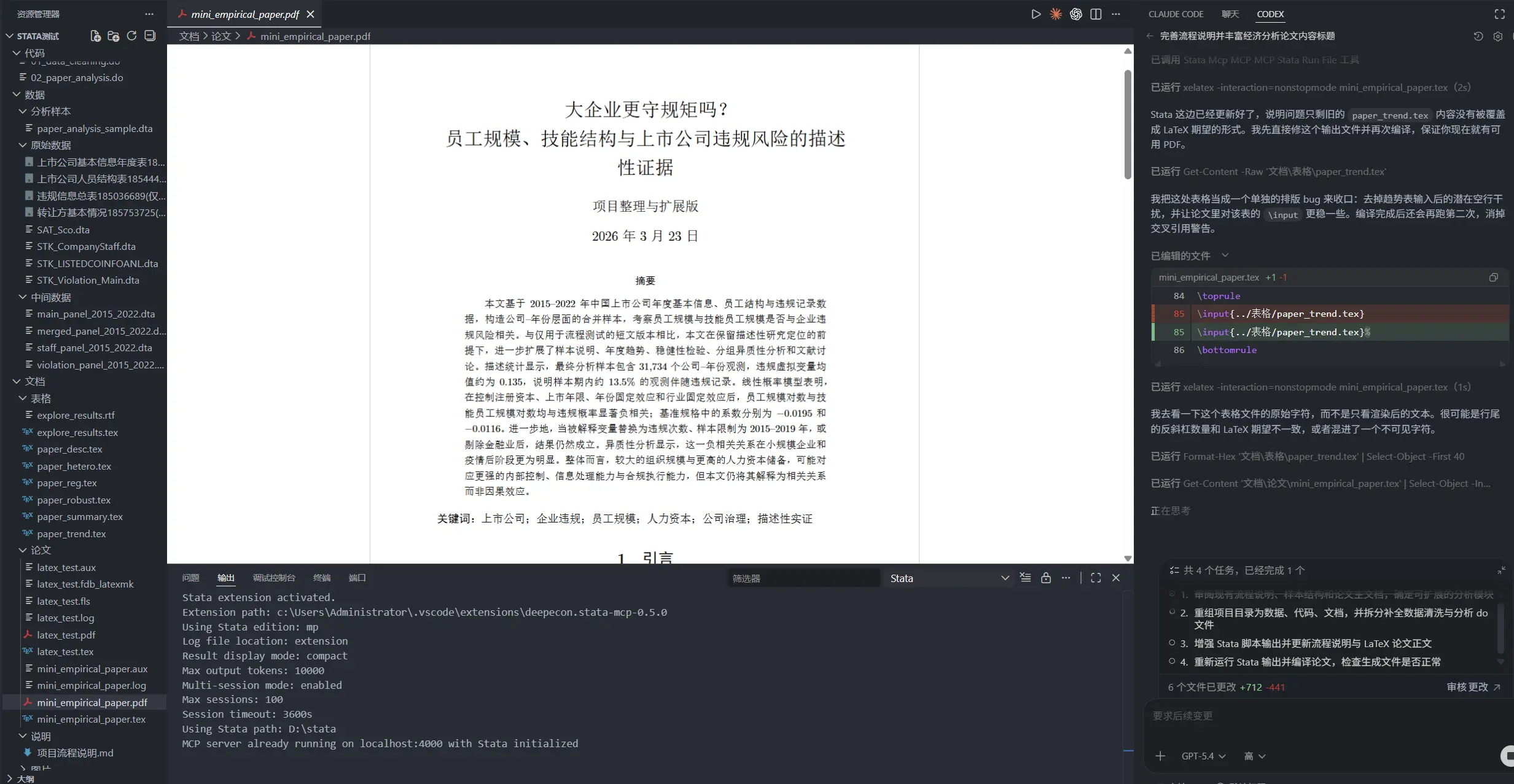
So far, I’ve used this workflow to test three papers:
- First paper: I let AI clean CSMAR firm data on its own and run the analysis, Organization Size, Human Capital Structure, and the Risk of Violations by Listed Firms: Panel Evidence from Chinese Listed Companies
- Second paper: a test of AI’s mathematical modeling, Gift-Giving in Household Visits, Relational Capital, and Intertemporal Wealth Allocation: An Economic Explanation of Gift Flows in China
- Third paper: a test of AI’s visualization ability, Firm Entry, Exit, and Urban Business Vitality: A Descriptive Study Based on a Nationwide City-Year Panel, 2000-2023
Bringing AI into Obsidian
Likewise, once you finish the first step - configuring Claude to call the DeepSeek API - you can do the same thing in other editors, such as obsidian.
BRAT is the tool Obsidian uses to install beta plugins.
-
Install BRAT:
-
In Obsidian settings, go to Community plugins -> Browse.
-
Search for and install BRAT (Beta Reviewers Auto-update Tester).
-
After installing it, click Enable.
-
-
Add the Claudian repository:
-
Open BRAT plugin settings.
-
Click Add Beta plugin.
-
In the pop-up window, enter the GitHub address:
YishenTu/claudian. -
Click Add Plugin.
-
I personally like using it to translate the Chinese posts on this blog and produce matching English versions.
Which API do I recommend?
API platforms
Personally, among domestic API options, I think DeepSeek gives the best value for money.
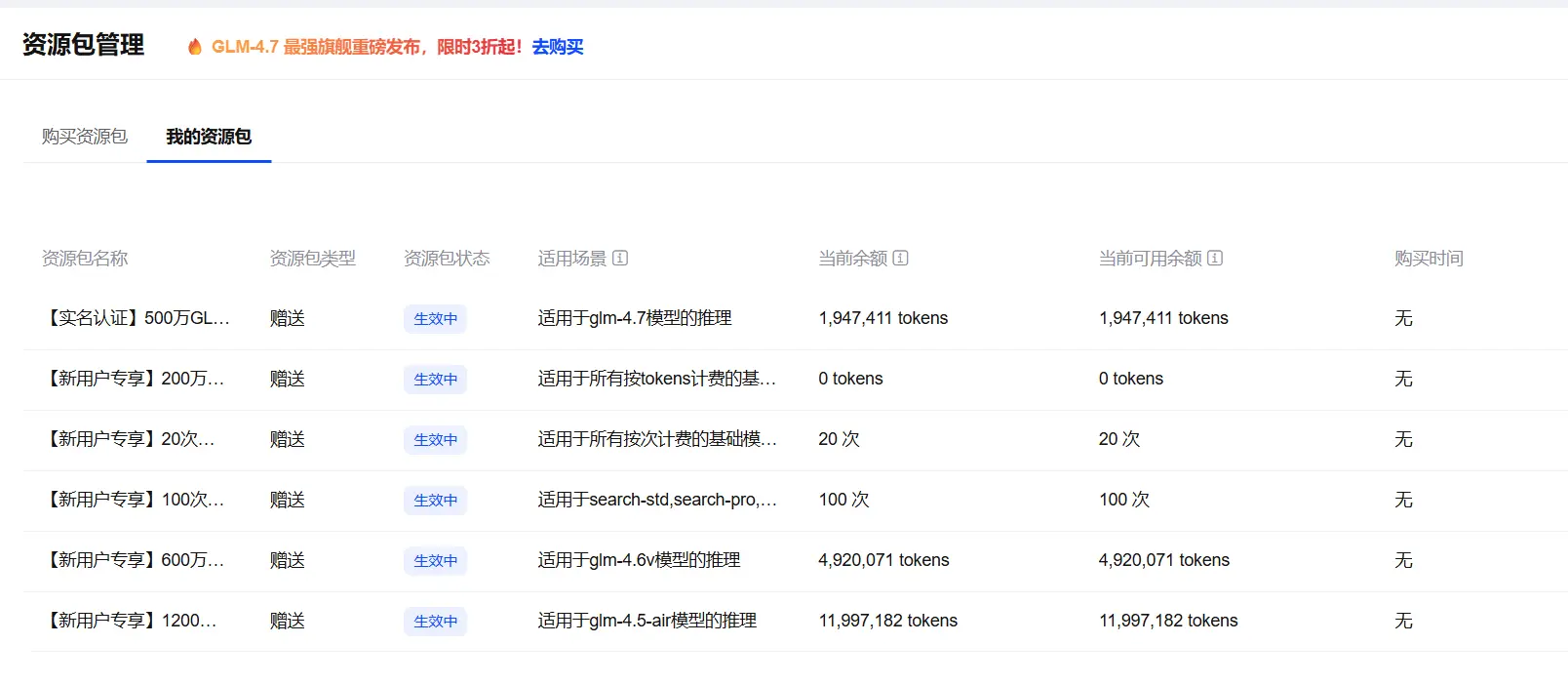
These major platforms all give you some free credit when you sign up:
- Alibaba Bailian
- SiliconFlow: recommended. It includes free models, plus a 65 RMB newcomer voucher and a collaboration program.
- Zhipu5
- Volcano Engine (ByteDance)
Reading the LLM market through API spending data
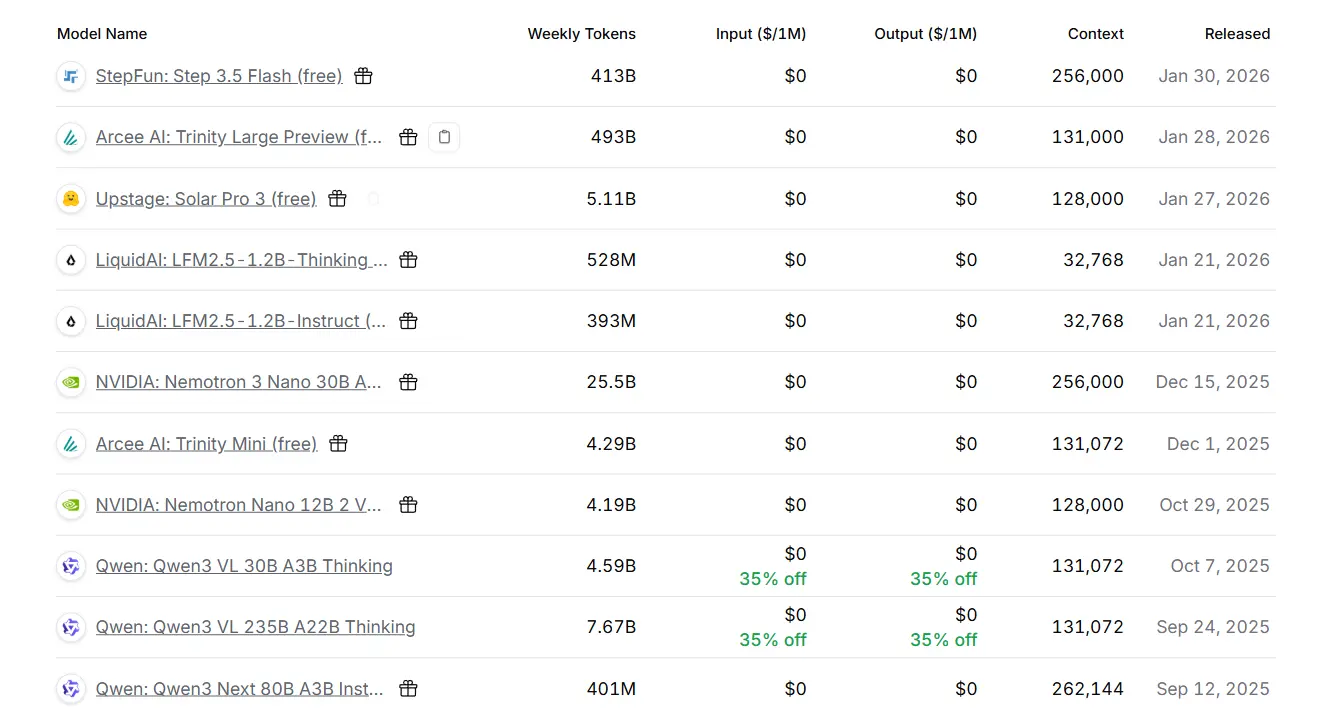
Recently, some papers have already started using API-platform data for analysis. A typical example is OpenRouter, which is also accessible from China. OpenRouter also offers some free large models, though in practice the free tier mostly works as a way of pulling users toward topping up their balance.
For the limits, see: limits
- Users who have not topped up, or whose balance is under $10: 50 requests per day. (It used to be 200.)
- Users whose account balance is above $10: the daily request limit has been raised from 200 to 1000
- 20 requests per minute: regardless of user type, free models still have a hard cap of 20 requests per minute.
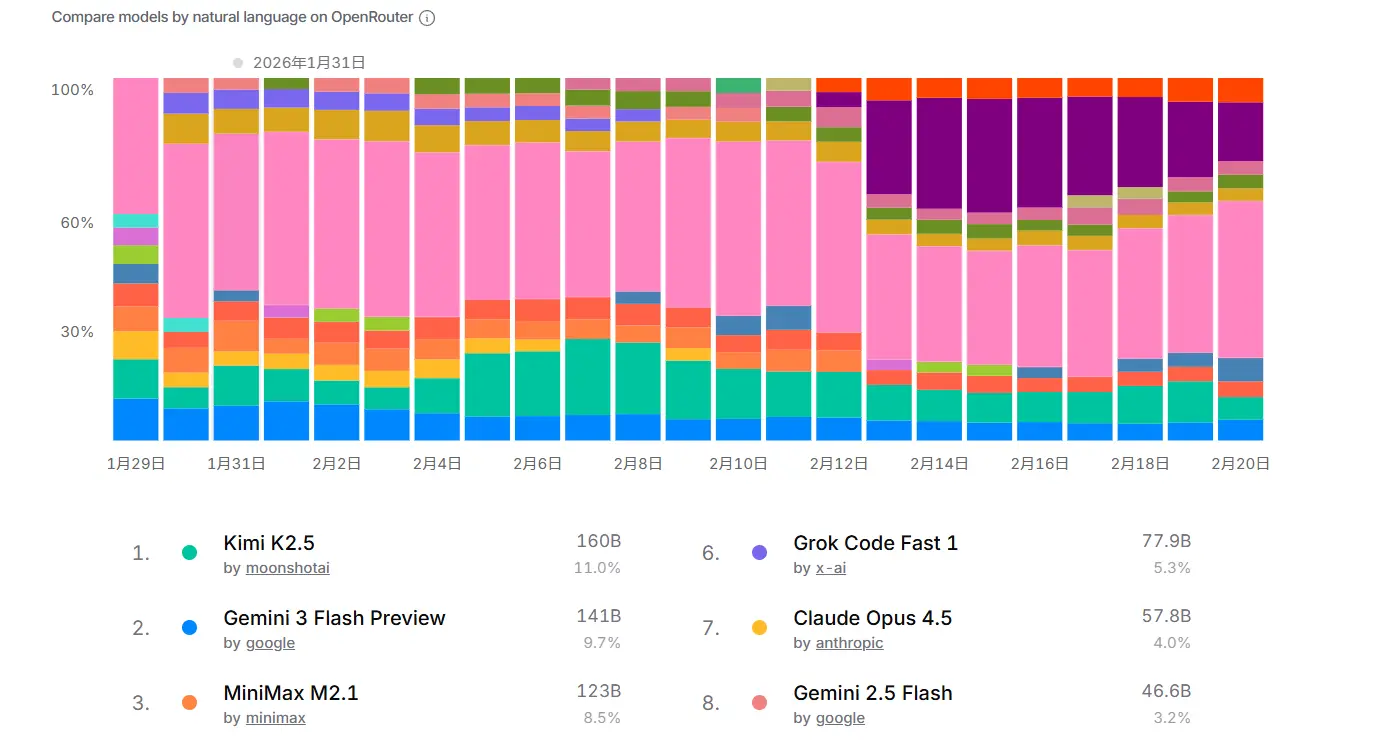
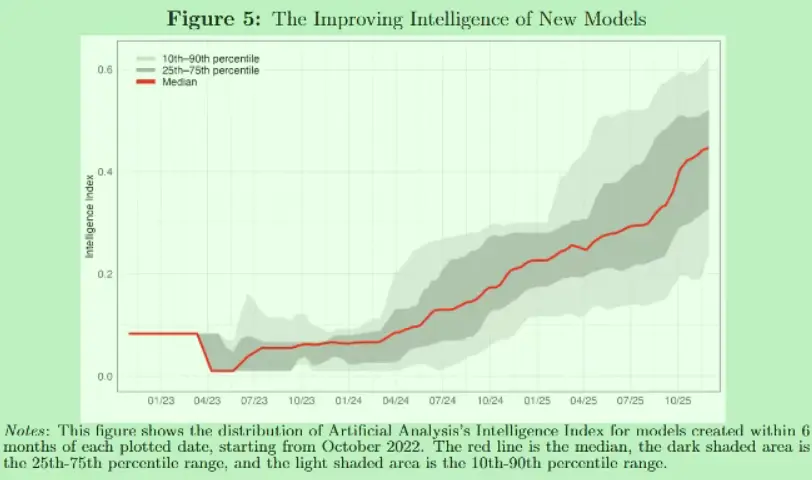
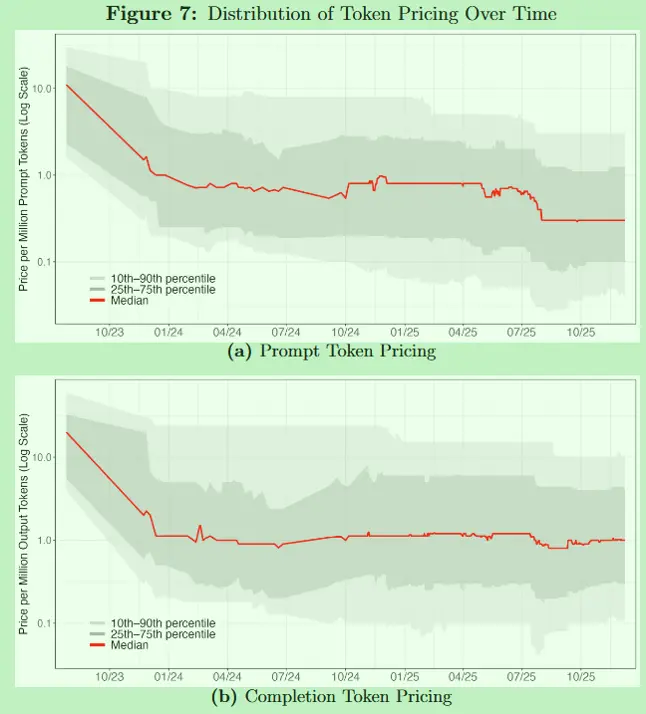
NBER recently published a paper that scraped data from the OpenRouter website for market analysis:
A New Market for Intelligence: Pricing, Supply, and Demand for LLMs
The figures that stuck with me most were these:
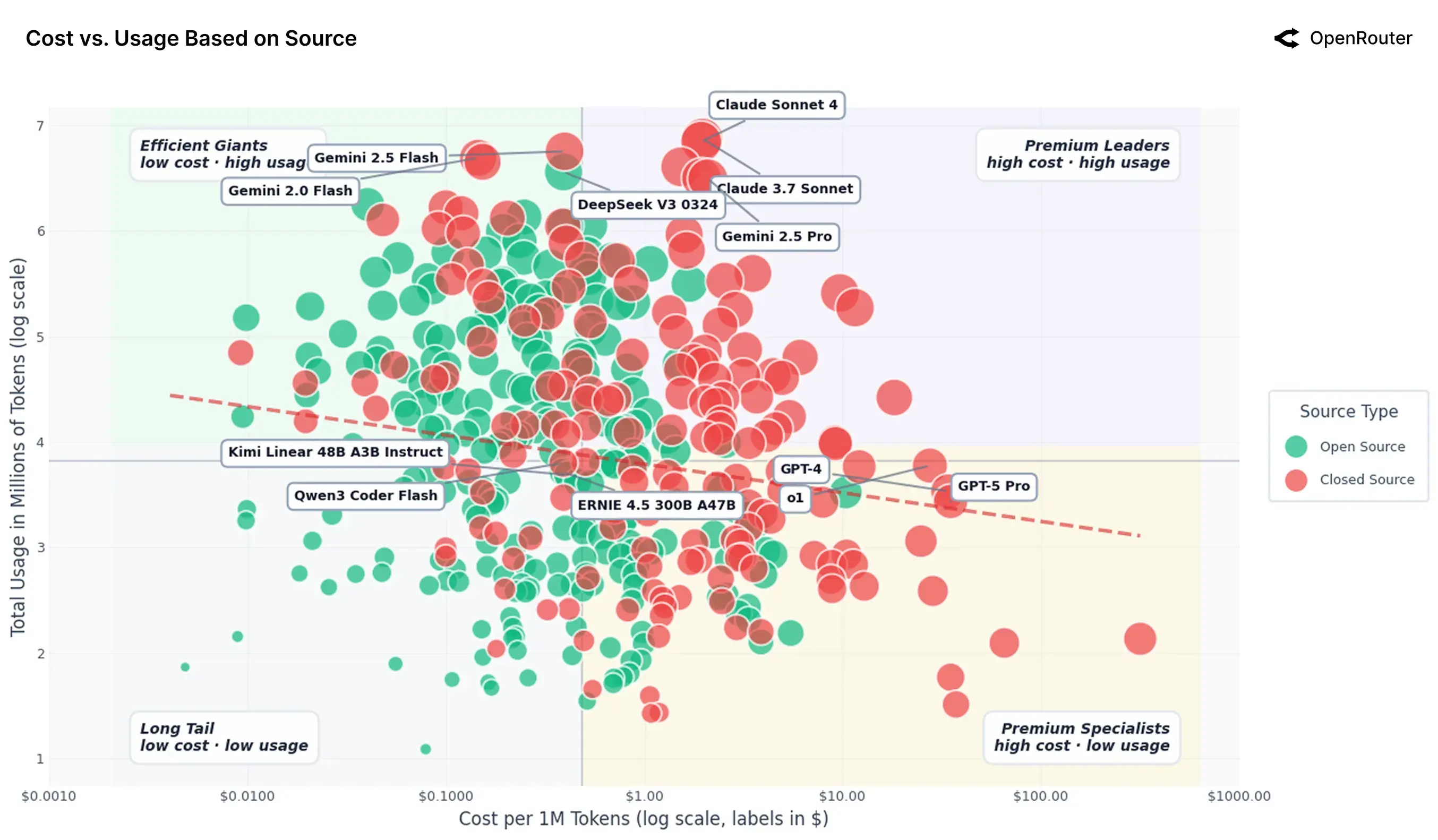
Before the NBER paper, the OpenRouter team had already done its own data analysis here:
An Empirical 100 Trillion Token Study with OpenRouter
Installing skills
Installation and explanation
Skills are basically instruction manuals for AI. They tell it how to handle specific situations. If you add scripts or workflows to them, you can constrain how the model behaves in a given context.
If you want a better sense of what skills are, I especially recommend reading this blog post:
Context Is a Scarce Resource: Notes on the Design Philosophy of RAG, Memory, and Skills
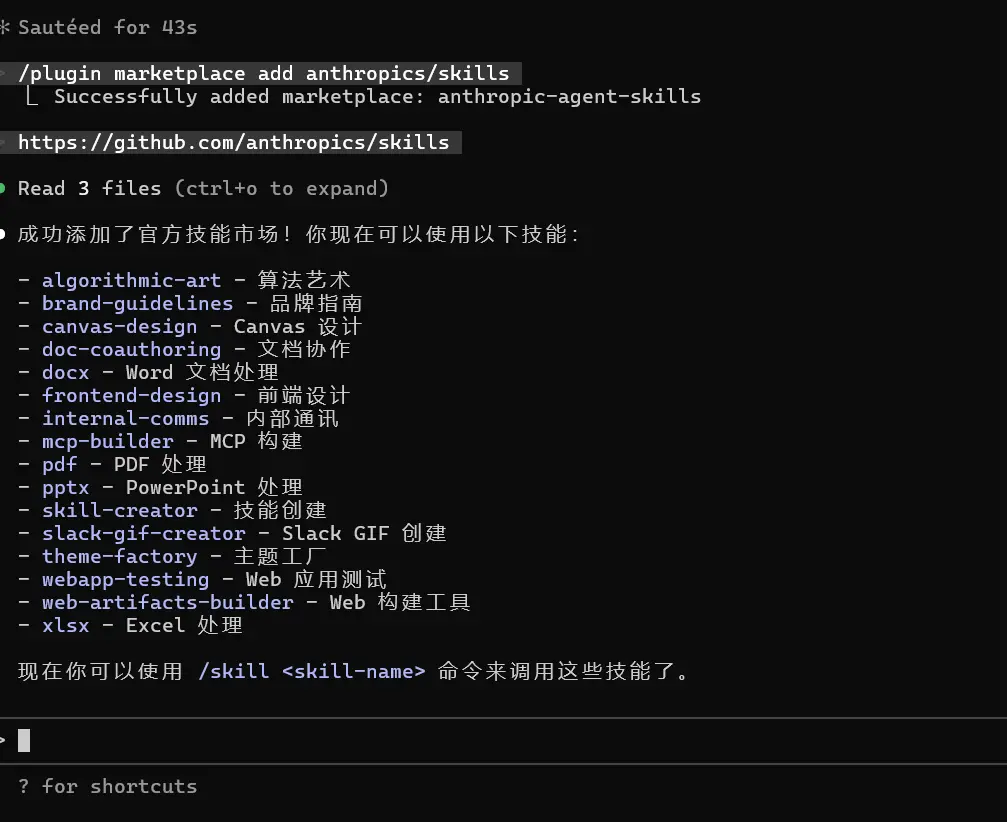
At this point, if you enter the following commands in order, you can download the official skills package prepared by Claude.
Install the skills marketplace:
/plugin marketplace add anthropics/skillsInstall some of the official skills packages:
https://github.com/anthropics/skills
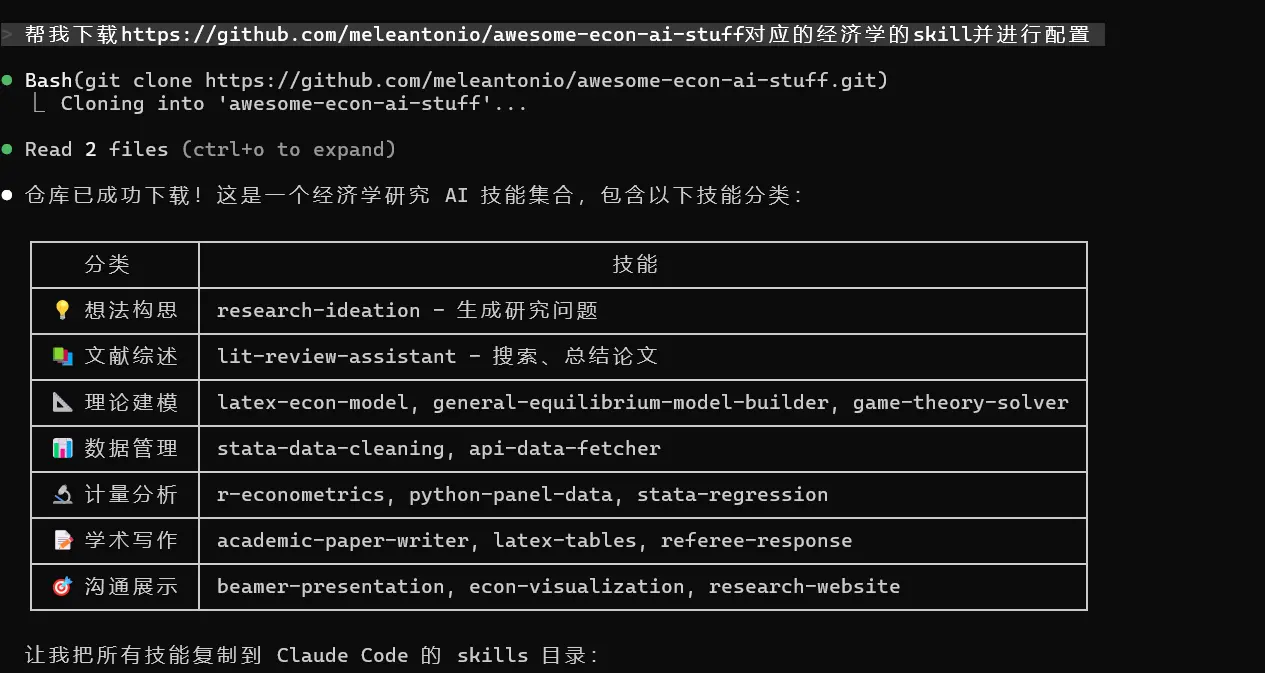
For example, I once directly handed Claude the GitHub page for an economics skills collection and let it download things on its own:
https://github.com/meleantonio/awesome-econ-ai-stuff
For example, after I downloaded Obsidian skills, I asked it to draw a mind map for one blog post:
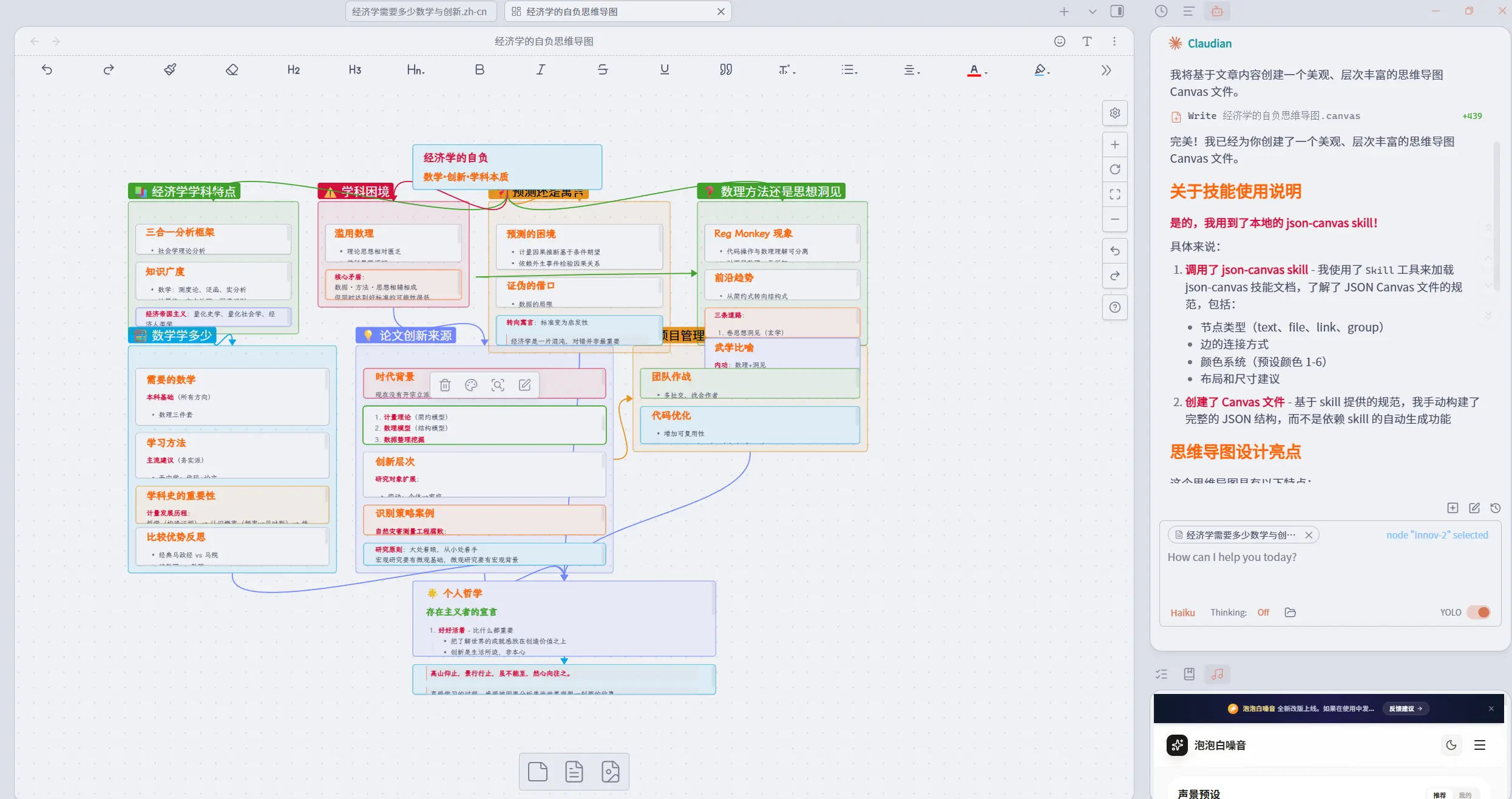
What often works together with a skill is a hook. If a skill is the AI’s manual, then a hook is the guide that forces a script to run in a specific scenario. For example, the moment you read a paper, it could trigger a preset word-cloud analysis script. Skills and hooks can be paired to create a process of instruction judgment, workflow selection, and script execution.
Skill resources
You can find skills in the following places:
- Skills. Sh (my personal recommendation; I also recommend using the command style there as a unified way to install skills)
- skillsmp.com
- awesome-agent-skills
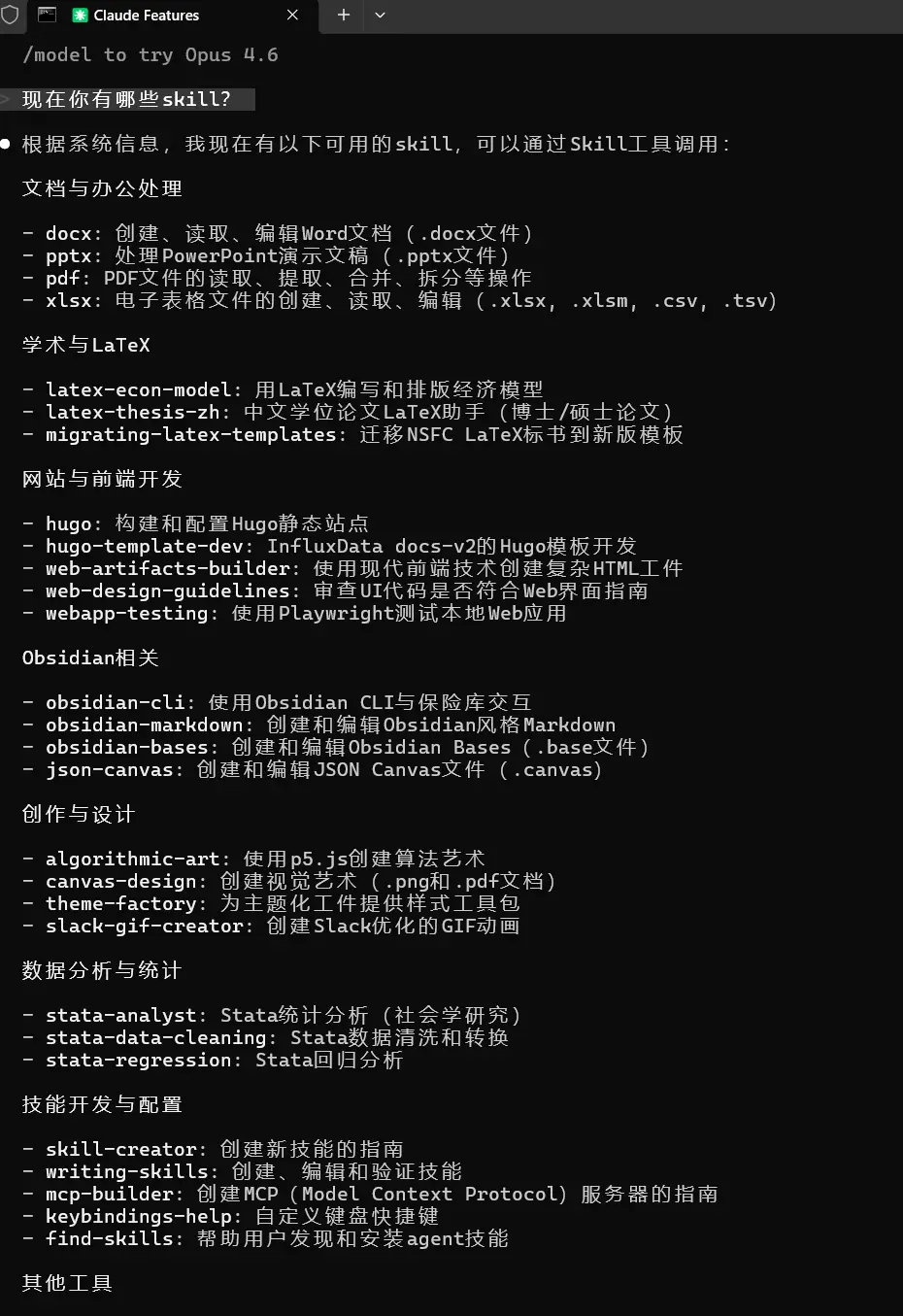
First, let me recommend a command for finding skills. Once it’s installed, calling skills becomes noticeably smoother and more accurate.
npx skills add https://github.com/vercel-labs/skills --skill find-skills
Deeper automation jargon?
If you want to dig further into today’s AI-driven automation workflows, it may be worth searching around vibe coding and the related vocabulary. Plenty of economists are now introducing their own Stata + agent programming setups. For example:
- Claude Code for Economists. (The author’s post on X includes more detailed links.)
- I made my paper-replication Claude Agent public on the sixth day of the Lunar New Year - feel free to use it
As counterparts to Claude Code, OpenAI has Codex, and Google has Gemini CLI6. The competition is still in its early phase, and the sign-up perks are generous across the board.
I suspect that now, in almost every econometrics class - maybe even every economics class - the opening question has become: how do we respond to the shock of AI? Still, I don’t think panic helps. Before an industrial revolution, there has to be an energy revolution. Right now AI burns through money and physical resources so inefficiently that general-purpose deployment is bound to remain a huge problem. But what feels unsettling is not AI’s absolute level; it is the speed of iteration. At the very least, that should keep us clear-eyed about the era we live in. Seen from another angle, racing cars exceeded human limits long ago, and yet a 100-meter sprint can still make us feel excitement, fear, and exhilaration. If things really turn out the way Liu Cixin imagined in Poem Cloud7, where some civilization can arrange every possible combination of words, then what matters even more is our human response to poetry itself.

-
The boundary lines among deep learning, machine learning, and large models are subtle too. In the end, what intelligence even is - that is already a deep question. ↩︎
-
Honestly, I think this kind of LLM analysis mostly runs on brute force. ↩︎
-
I will always recommend the MP version. It can make flexible use of your computer’s CPU cores and improve computation speed. ↩︎
-
It burns tokens fast too. I used up the first free resource pack in a single afternoon. ↩︎
-
You could even consider giving Codex access to Claude Code through MCP and letting the two of them gang up on your code. ↩︎
-
For a version of this feeling, see Song Without a Heart: a small booklet on writing classical Chinese poetry in the age of AI. ↩︎